UPC Check Digit Calculator (GTIN, EAN, SSCC)
Enter a number without its last digit to get the check digit, or the full number to check it. Paste many numbers at once.
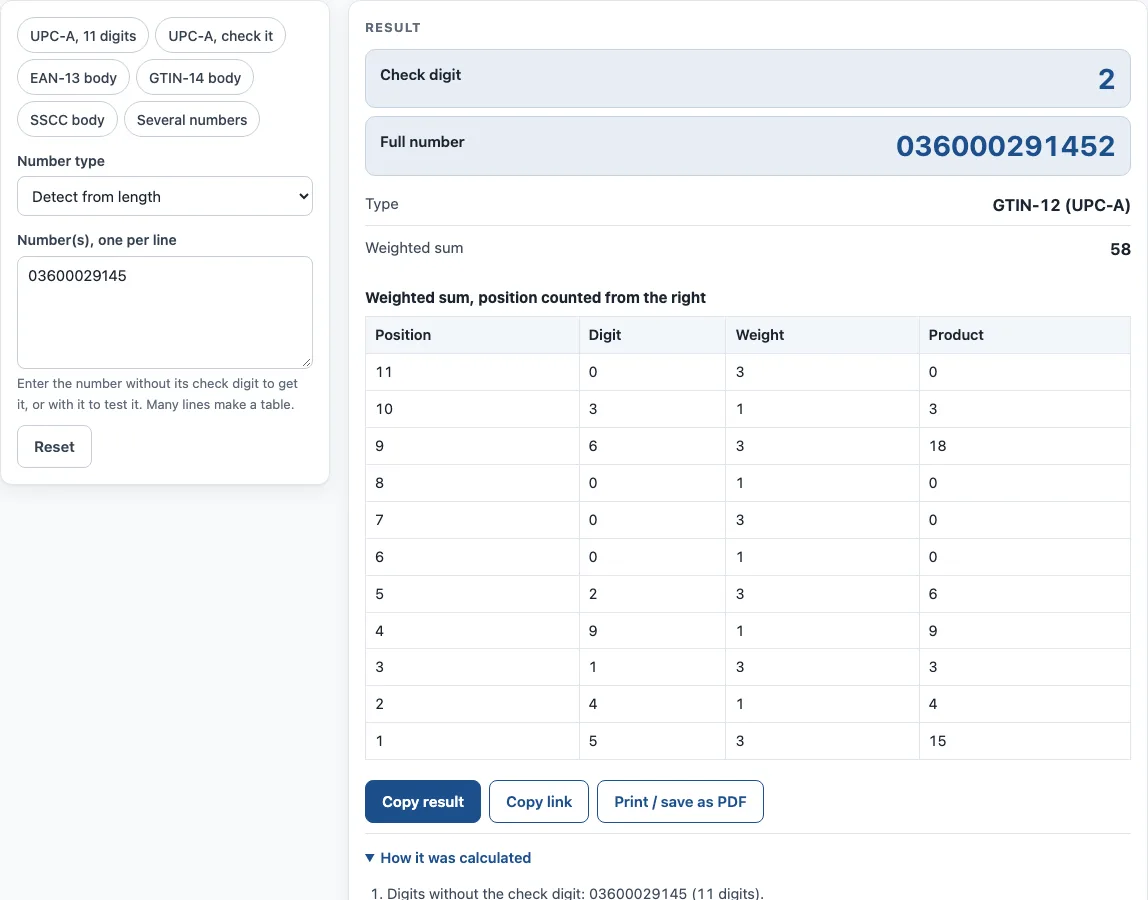
How to use the UPC Check Digit Calculator
- Open the Number type list and choose a number type. To let the tool decide, pick Detect from length. The other options are GTIN-8 (EAN-8), GTIN-12 (UPC-A), GTIN-13 (EAN-13), GTIN-14 (ITF-14), GLN (13 digits) and SSCC (18 digits).
- In the Number(s), one per line box, type or paste your number. Leave off the check digit to calculate it, or include it to test it.
- To work on several numbers, put each one on its own line. Many lines produce a table.
- Read the result lines: Check digit, Full number, Check digit given, Type, Weighted sum, Numbers and Processed.
- Open How it was calculated to see each step worked out with your own digits, and the table of each digit, its weight and the product.
- For a list, read the table: each number, its check digit and whether a check digit you typed is valid.
The example buttons load sample inputs: UPC-A 11 digits, UPC-A check it, EAN-13 body, GTIN-14 body, SSCC body and Several numbers. Under the result, Copy result copies the figures. Copy link keeps all your inputs in the page address, so opening that link restores the same result. Print / save as PDF prints the inputs, the result, the calculation steps and the date.
How is a UPC check digit calculated?
A UPC check digit is found by multiplying the digits alternately by 3 and 1, adding the results, and choosing the digit that brings the total up to the next multiple of 10. If the total is already a multiple of 10, the check digit is 0. The weights start from the digit just before the check digit position and move left.
- Write down the digits without the check digit.
- Starting from the rightmost digit, multiply by 3, then 1, then 3, and so on across the number.
- Add all the results together to get the weighted sum.
- Find the next multiple of 10 above the sum. Subtract the sum from it. That difference is the check digit.
Take the UPC-A body 03600029145. The weighted sum is 5×3 + 4×1 + 1×3 + 9×1 + 2×3 + 0 + 0 + 0 + 6×3 + 3×1 + 0×3 = 58. The next multiple of 10 is 60, so the check digit is 2. The full UPC is 036000291452.
Which numbers use this check digit, and what does it catch?
All GS1 identification numbers use this same mod-10 check digit, including GTIN-8, UPC-A, GTIN-13, GTIN-14, GLN and SSCC. A UPC-A can be written as a GTIN-13 by adding one leading 0, or as a GTIN-14 by adding two leading 0s, and the check digit stays the same.
The check digit catches every single-digit error and most swaps of two neighbouring digits. This makes it useful for spotting typing mistakes, but it has a limit. A correct check digit only shows that the number is arithmetically valid. It does not show that the number is licensed to the person using it. GS1’s GEPIR / Verified by GS1 service shows who owns a company prefix.
Sources
- GS1 check digit calculation and the GS1 General Specifications — mod-10 check digit for GTIN-8/12/13/14, GLN and SSCC.
Worked examples
| Input | Result |
|---|---|
| 03600029145 | GTIN-12 (UPC-A): check digit 2, full number 036000291452 |
| 036000291452 | GTIN-12 (UPC-A): check digit 2, full number 036000291452 |
| 400638133393 | GTIN-13 (EAN-13): check digit 1, full number 4006381333931 |
| 1540014128876 | GTIN-14: check digit 3, full number 15400141288763 |
| 10614141123456789 | SSCC: check digit 7, full number 106141411234567897 |
Calculated by the tool above with these values.
Frequently asked questions
Do I need to type the check digit?
No. Enter the number without it and the tool calculates the check digit and gives you the full number. If you do include it, the tool tests it instead.
Can I check many numbers at once?
Yes. Put each number on its own line in the Number(s), one per line box. The tool then shows the results as a table.
What is the check digit of a GTIN-14?
The same mod-10 method applies: weights 3 and 1 from the right over the first 13 digits. Choose GTIN-14 (ITF-14) or let the tool detect it from the length; the steps show each product and the weighted sum.
Is my data sent to a server?
No. The calculator runs in your browser, and nothing you type is uploaded.
Can I use the results on product packaging?
Yes. Results may be used in commercial work, including on products, packaging and documents, with no attribution. A correct check digit still does not confirm that a number is licensed to you, so check the prefix ownership as described above.
Does the tool work with ISBN-13 or ITF-14 codes?
Yes. An ISBN-13 is a GTIN-13, so choose GTIN-13 (EAN-13) or let the tool detect the length. ITF-14 carries a GTIN-14. The older ISBN-10 uses a different mod-11 check digit; the ISBN barcode generator handles that one.
Related tools
- UPC barcode generator — UPC-A and UPC-E barcodes for retail products, with add-ons and GS1 sizes.
- GS1 barcode generator — GS1-128 labels with Application Identifiers, EAN-13 and ITF-14 carton codes.
- Container check digit calculator — check the ISO 6346 check digit of a shipping container number.
- ISBN barcode generator — the EAN-13 barcode for a book cover, with the ISBN text and price add-on.
- Barcode generator — Code 128, Code 39, EAN, UPC, ITF-14, Codabar and GS1-128, single or a sheet of labels.
- Data Matrix generator — a small 2D code for serial numbers, parts and GS1 healthcare labels.