UPC Barcode Generator (UPC-A and UPC-E)
Enter your UPC number to get a scannable UPC-A or UPC-E barcode with the correct check digit, at 80–200% size.
The UPC Barcode Generator draws a UPC-A or UPC-E barcode from a 12-digit, 11-digit or shorter UPC number you already have, and lets you download it as an SVG file or a PNG image at 300 or 600 dpi. It runs entirely in your browser, is free, and needs no sign-up. Nothing you type is uploaded.
Use it as a UPC maker to generate a UPC barcode for product packaging, to generate UPC label artwork, or to create UPC barcode files for a printer. Whether you call it a universal product code generator, a free UPC creator or a UPC gen, generating UPC barcodes starts from the number GS1 gave you. You can add a 2- or 5-digit add-on and resize the barcode. The tool checks the check digit for you, so you can see whether your number is valid before you print. Results may be used in commercial work with no attribution.
How to use the UPC Barcode Generator
- Under What do you have?, choose the mode: UPC-A (11 or 12 digits), UPC-E number (6–8 digits), or UPC-A → draw as UPC-E.
- Type your number in the UPC number field. For UPC-A, 11 digits get a check digit added; 12 digits have their check digit verified.
- If your product needs an add-on, type 2 digits (issue number) or 5 digits (price, books) in Add-on (optional). Leave it empty if you don’t need one.
- Set Size (% of nominal, 80–200). 100 % is the standard size.
- Turn on Show numbers under the bars and Keep quiet zones (blank margins) if you need them.
- Choose a PNG resolution: 300 dpi or 600 dpi. Download SVG gives a vector file that stays sharp at any size.
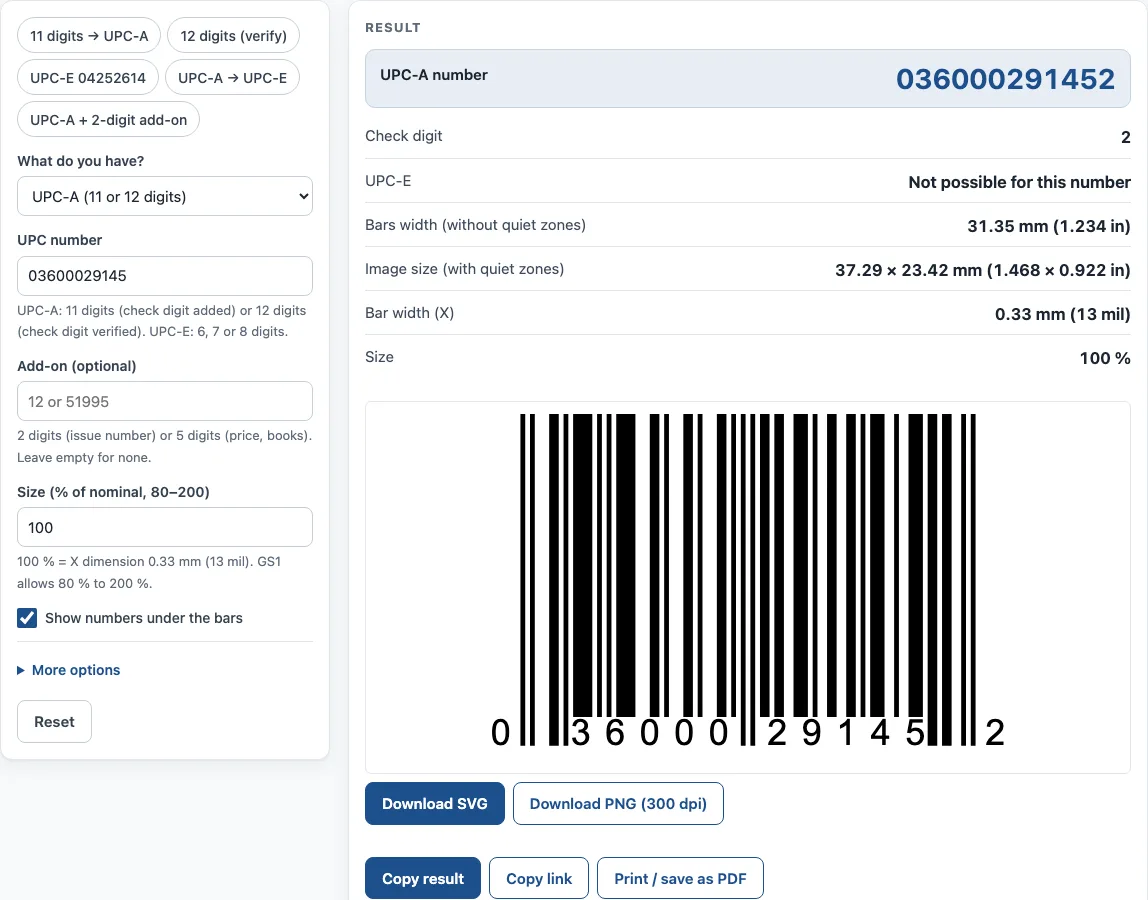
- Check the result lines: the full UPC-A number, the check digit, the UPC-E form if one exists, the bar width and the image size with quiet zones.
- Download the barcode or print it, and test-scan a printed sample before a large run.
Not sure where to start? The example buttons fill in sample inputs, such as 11 digits → UPC-A, 12 digits (verify), UPC-E 04252614, UPC-A → UPC-E, and UPC-A + 2-digit add-on.
Under the result, Copy result copies the values, and Copy link saves a link that restores all your inputs. Print / save as PDF prints the inputs, the result, the calculation steps and the date.
What is a UPC-A barcode made of?
A UPC-A barcode is a 12-digit number. The first digit is the number system digit. The next 5 digits are the company prefix, and the next 5 are the item number. GS1 assigns the company and item parts, and the split varies with the length of the company prefix. The last digit is the check digit. Under the GS1 prefix list, a leading 2 marks restricted-circulation numbers set by the local GS1 office (in the US, random-weight items such as meat and produce), 3 is used in the US for drugs (NDC), and 4 is for a company’s internal, in-store use. Prefix 5, once used for coupons, is now reserved by GS1 US.
How is the UPC check digit calculated?
The UPC check digit is worked out in three steps:
- Add the digits in odd positions (1st, 3rd, up to 11th) and multiply the total by 3.
- Add the digits in even positions (2nd, 4th, up to 10th).
- Add the two totals. The check digit is the number that brings the result up to the next multiple of 10.
For 03600029145, the odd positions give (0+6+0+2+1+5) × 3 = 42, and the even positions give 3+0+0+9+4 = 16. The total is 58, so the check digit is 2 and the full number is 036000291452.
What is a UPC-E barcode?
UPC-E is an 8-digit, zero-suppressed form of a UPC-A number, used on small packages where a full barcode would not fit. Only UPC-A numbers with number system 0 or 1, and with enough zeros in the right places, can be written as UPC-E. For example, UPC-A 042100005264 can be written as UPC-E 04252614.
How big should a UPC barcode be?
At 100 %, the X dimension (the width of the narrowest bar) is 0.33 mm (13 mil). A UPC-A symbol at this size is about 37.29 mm wide, including the quiet zones. GS1 allows sizes from 80 % to 200 % for retail point of sale. Do not cut off the bar height (truncation), because scanners may fail to read the code.
What does a UPC add-on do?
An add-on is a short extra barcode placed beside the main UPC symbol. A 2-digit add-on is used for periodical issue numbers. A 5-digit add-on is used for suggested prices on books and some magazines.
Do I need a GS1 license for a UPC number?
Yes, if you sell products in stores. UPC numbers for retail must be licensed from GS1 US or another GS1 member organisation. This tool draws the barcode for a number you already have. It does not issue or sell numbers. Numbers bought from resellers of old UPC codes may not be accepted by large retailers, which check the GS1 database.
Sources
- GS1 General Specifications — UPC-A/UPC-E structure, 80–200% magnification, 0.330 mm nominal X dimension.
- GS1 Canada EAN/UPC Symbol Reference — sizes and quiet zones at each magnification.
- GS1 check digit calculation
Worked examples
| Input | Result |
|---|---|
| UPC-A (11 or 12 digits): 03600029145, 100% | UPC-A 036000291452, check digit 2, 37.29 × 23.42 mm (1.468 × 0.922 in) |
| UPC-E number (6–8 digits): 04252614, 100% | UPC-A 042100005264, check digit 4, 22.11 × 23.42 mm (0.87 × 0.922 in) |
| UPC-A → draw as UPC-E: 042100005264, 100% | UPC-A 042100005264, check digit 4, 22.11 × 23.42 mm (0.87 × 0.922 in) |
| UPC-A (11 or 12 digits): 03600029145 + 12, 80% | UPC-A 036000291452, check digit 2, 36.43 × 18.74 mm (1.434 × 0.738 in) |
| UPC-A (11 or 12 digits): 012345678905 + 54321, 150% | UPC-A 012345678905, check digit 5, 81.68 × 35.13 mm (3.216 × 1.383 in) |
Calculated by the tool above with these values.
Frequently asked questions
Is the UPC Barcode Generator free?
Yes. It is free to use and needs no sign-up. Everything runs in your browser, and nothing you type is uploaded.
Can I use the barcode on my product packaging?
Yes. Results may be used in commercial work, including on products, packaging and documents, with no attribution. You still need a valid GS1 number for retail sale.
What is the difference between UPC-A and UPC-E?
UPC-A is a 12-digit barcode. UPC-E is an 8-digit, zero-suppressed version of a UPC-A number for small packages. Only certain UPC-A numbers can be converted to UPC-E.
Does a UPC-A barcode work with scanners outside North America?
Yes. A UPC-A number is the same as an EAN-13 number with a leading 0, and scanners outside North America read UPC-A as EAN-13.
What happens if my check digit is wrong?
If you enter 12 digits, the tool verifies the check digit; if it is wrong, a warning shows the correct digit and the barcode uses the correct one. If you enter 11 digits, the check digit is added for you. Confirm the full number in the result before printing.
Can I save my barcode settings?
Yes. Copy link saves the page address, which keeps all your inputs. Opening that link restores the same result.
Can I print the barcode with its calculation steps?
Yes. Print / save as PDF prints the inputs, the result, the calculation steps and the date.
Related tools
- UPC check digit calculator — get or verify the check digit of a UPC, EAN, GTIN-14, GLN or SSCC.
- Barcode generator — Code 128, Code 39, EAN, UPC, ITF-14, Codabar and GS1-128, single or a sheet of labels.
- GS1 barcode generator — GS1-128 labels with Application Identifiers, EAN-13 and ITF-14 carton codes.
- ISBN barcode generator — the EAN-13 barcode for a book cover, with the ISBN text and price add-on.
- Data Matrix generator — a small 2D code for serial numbers, parts and GS1 healthcare labels.
- HTS code lookup — find the US import classification number and its duty rates.