SSCC Label Generator (GS1 Logistic Label)
Enter your company prefix and serial reference to get the SSCC and a ready-to-print pallet or carton label.
The SSCC label generator creates a GS1 logistic label with a Serial Shipping Container Code (SSCC) for a pallet, carton or parcel. You enter your GS1 Company Prefix, an extension digit and a serial reference, and the tool adds the check digit and builds the GS1-128 barcodes for you.
It runs in your browser, is free, and needs no sign-up. Nothing you type is uploaded. You can add optional shipping details and product data, choose a label size, and then print the label at real size or download it as SVG or PNG at 203 or 300 dpi. The data under the barcodes is written out with GS1 data titles, so people can read it too.
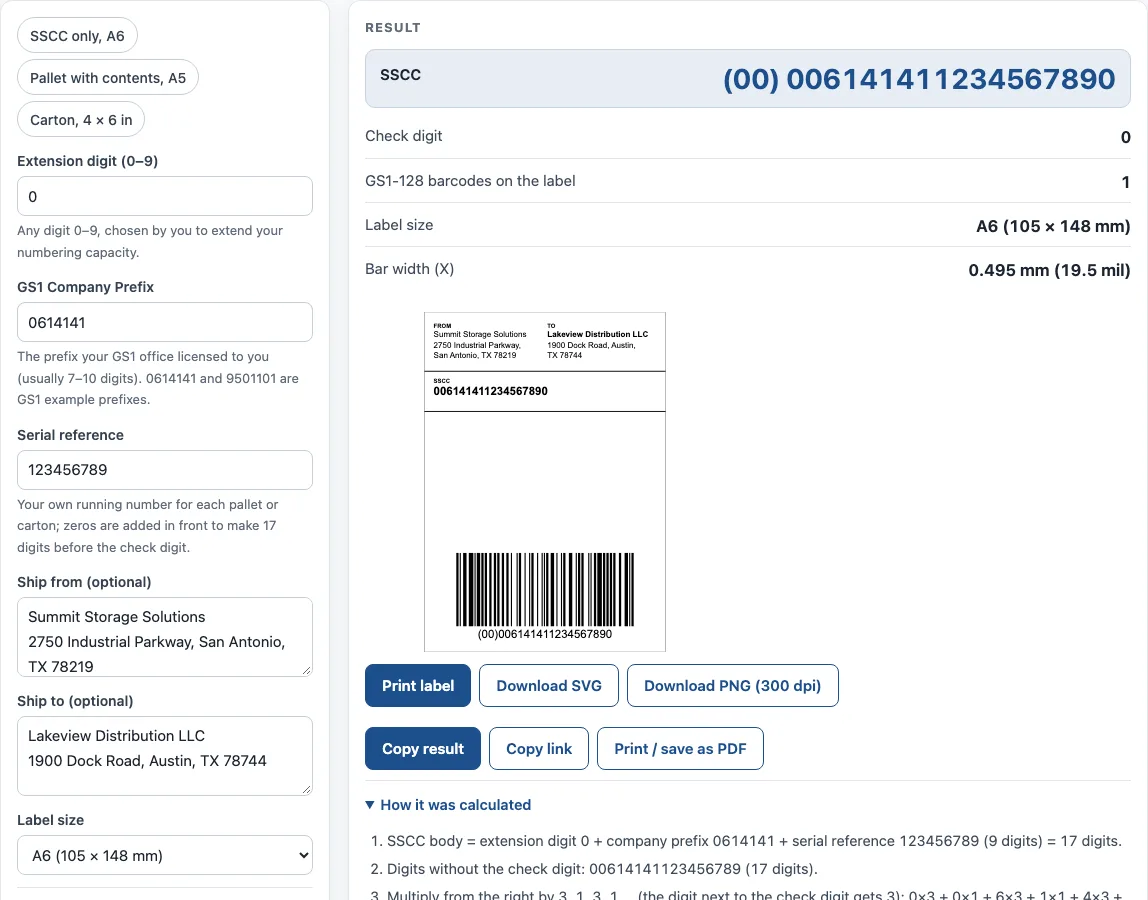
How to use the SSCC label generator
- Enter the extension digit (0–9).
- Enter your GS1 Company Prefix, the prefix your GS1 office licensed to you.
- Enter the serial reference, your own running number for each pallet or carton. The tool adds zeros in front so the number has 17 digits before the check digit.
- Optionally fill in Ship from and Ship to.
- Under More options: if every item on the unit has the same GTIN, enter it in Content (AI 02) and enter the number of items in Count (AI 37).
- Also under More options, add any optional data you need: Batch / lot (AI 10), Best before date (AI 15), Use by / expiry date (AI 17), Gross weight in kg (AI 330n) and Customer order number (AI 400).
- Choose a Label size: A6, 4 × 6 in, A5 or 6 × 8 in.
- Check the Bar width (X) and Bar height (under More options). Keep the bar width at 0.495–0.94 mm and the bar height at 31.75 mm or more.
- Read the result: the SSCC, the check digit, the GS1-128 barcodes on the label, the label size and the bar width.
- Choose Print label for real size, or download SVG or PNG at 203 or 300 dpi.
The example buttons fill the form for three common cases: SSCC only on A6, a pallet with contents on A5, and a carton on 4 × 6 in. Under the result, Copy result copies the output, and Copy link saves all your inputs in the page address. Print / save as PDF includes your inputs, the result, the calculation steps and the date.
What is an SSCC and what does it identify?
An SSCC is the GS1 identification number of a logistic unit, such as a pallet, carton or parcel. It is the only mandatory element on a GS1 logistic label, and it has 18 digits.
The 18 digits are an extension digit, your GS1 Company Prefix, a serial reference you assign, and a check digit. In the barcode, the SSCC follows Application Identifier (00). GS1’s example is (00) 1 0614141 123456789 7, which gives 106141411234567897. An SSCC must never be reused.
How is the SSCC check digit calculated?
The check digit is calculated from the first 17 digits. Count from the right and multiply the rightmost digit by 3, the next by 1, and keep alternating 3 and 1 across all 17 digits. Add the products. Then subtract the last digit of that sum from 10. If the result is 10, the check digit is 0.
For 106141411234567897, the weighted sum of 10614141123456789 is 143. The last digit of 143 is 3, and 10 − 3 = 7. The check digit is 7, which matches the example. The tool’s “How it was calculated” list shows these steps with your own values.
What goes on a GS1 logistic label?
A GS1 logistic label has three blocks. The top block holds free text, such as the ship-from and ship-to addresses. The middle block shows the data written out, with titles in capitals such as SSCC, CONTENT, COUNT, BATCH/LOT, BEST BEFORE, GROSS WEIGHT (kg) and ORDER NUMBER. The bottom block holds the GS1-128 barcodes, and the SSCC barcode is the bottom one.
CONTENT (AI 02) gives the GTIN of identical trade items on the unit and is used together with COUNT (AI 37). AI (02) and AI (01) are never used together on a logistic label. The tool packs the extra data into as few GS1-128 barcodes as fit the label width.
Which bar width, bar height and label size should you use?
For GS1-128 barcodes on logistic labels, the narrowest bar (X-dimension) must be between 0.495 mm and 0.94 mm, and 0.495 mm is the target. The bar height must be at least 31.75 mm (1.25 in). Quiet zones must be at least 10 times the X-dimension, and the human-readable text must be at least 3 mm high.
A6 (105 × 148 mm) or 4 × 6 in (102 × 152 mm) suits an SSCC with little data. A5 (148 × 210 mm) or 6 × 8 in (152 × 203 mm) suits labels with trade item data, such as pallets. On cartons, the bottom of the barcode should be about 32 mm (1.25 in) from the base and at least 19 mm from a vertical edge.
Sources
- GS1 Logistic Label Guideline, release 1.3 (Jul 2019) — SSCC structure (3.1), CONTENT and COUNT (4-4), data titles (6.2.1), X-dimension 0.495–0.94 mm (6-15), bar height ≥ 31.75 mm (6-18), quiet zones (6-19), label sizes (section 7).
- GS1-128 encoding: the same encoder as our GS1 barcode generator; labels were decoded with zxing-cpp.
Worked examples
| Input | Result |
|---|---|
| Extension 0, prefix 0614141, serial 123456789 | SSCC 006141411234567890, 1 barcode(s) |
| Extension 0, prefix 0614141, serial 123456789 | SSCC 006141411234567890, 3 barcode(s) |
| Extension 3, prefix 9501101, serial 42 | SSCC 395011010000000422, 1 barcode(s) |
Calculated by the tool above with these values.
Frequently asked questions
Can I use any number as the serial reference?
You can choose the serial reference, but each SSCC must be unique. Never reuse an SSCC, even after the pallet or carton it marked has been shipped.
Do I need a GS1 Company Prefix to use the tool?
Yes, for a label you will use in real trade. The prefix must be the one your GS1 office licensed to you. The GS1 example prefixes 0614141 and 9501101 are useful only for practising the layout.
Can the label show which product is on the pallet?
Yes, when every item on the unit is the same product. Enter its GTIN in Content and the number of items in Count, and the tool adds them to the label with the SSCC. Do not put AI (02) and AI (01) together on the same logistic label.
Can I use the labels on commercial products or documents?
Yes. Results may be used in commercial work on products, packaging and documents, with no attribution required.
Can I print the label on a thermal label printer?
Yes. Choose 4 × 6 in or A6, then use Print label, which prints only the label at its real size, or download the PNG at 203 or 300 dpi to match your printer.
Related tools
- GS1 barcode generator — GS1-128 labels with Application Identifiers, EAN-13 and ITF-14 carton codes.
- UPC check digit calculator — get or verify the check digit of a UPC, EAN, GTIN-14, GLN or SSCC.
- GTIN generator — GTIN-13, UPC-A and GTIN-14 lists from your company prefix.
- Container check digit calculator — check the ISO 6346 check digit of a shipping container number.
- Barcode generator — Code 128, Code 39, EAN, UPC, ITF-14, Codabar and GS1-128, single or a sheet of labels.
- Code 128 barcode generator — Code 128 with the code sets and check character worked out.