Postal Barcode Generator (USPS Intelligent Mail Barcode)
Enter the IMb fields and the delivery ZIP code to get the 4-state Intelligent Mail barcode, drawn at USPS dimensions.
The Postal Barcode Generator creates an Intelligent Mail barcode (IMb), the USPS 4-state postal barcode printed on letters and flats. You enter your barcode identifier, service type, Mailer ID, serial number and delivery ZIP code, and the tool draws the barcode and shows its 20-digit tracking code and routing code.
Everything runs in your browser, so nothing you type is uploaded. The tool is free and needs no sign-up. Its output was checked against the four examples in Appendix C of USPS-B-3200, and the bars match exactly. The barcode is drawn at USPS nominal dimensions and can be downloaded as SVG or PNG.
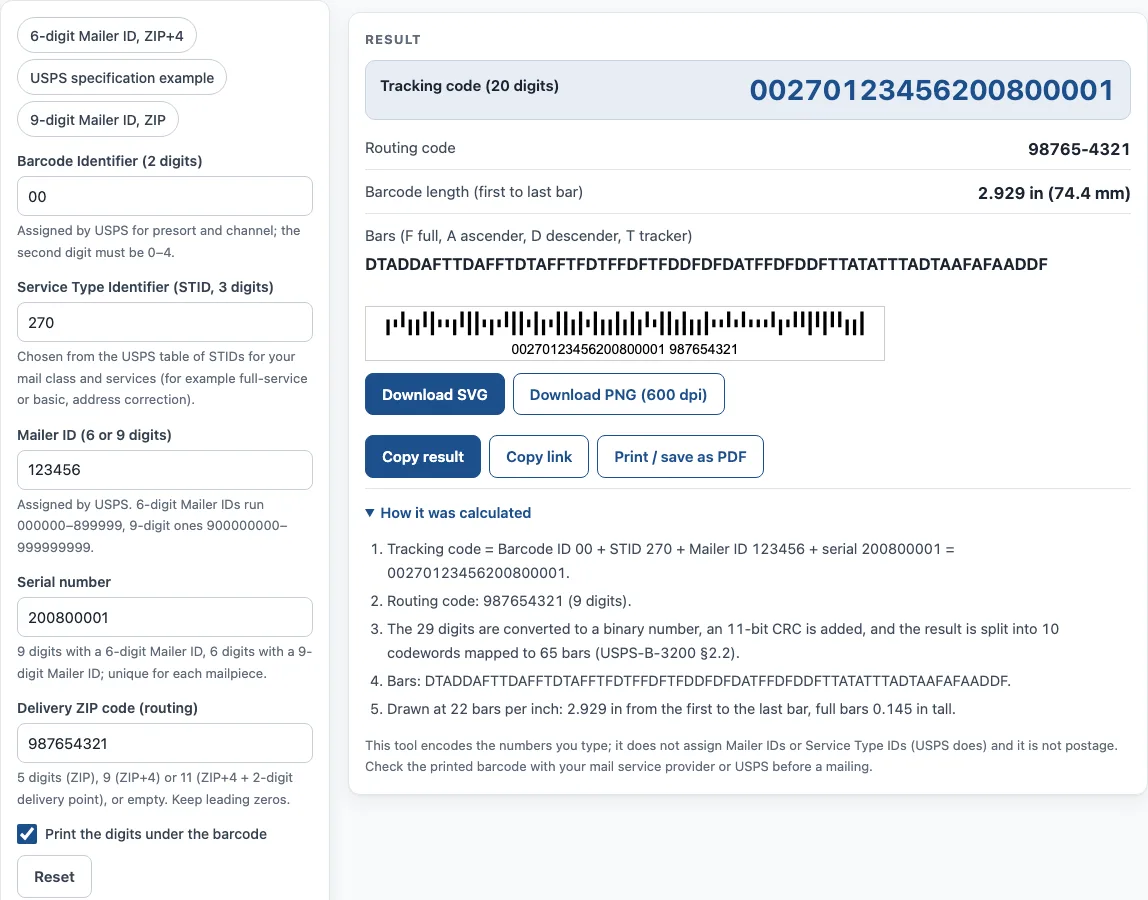
How to use the Postal Barcode Generator
- Type the 2-digit Barcode Identifier; its second digit must be 0–4.
- Type the 3-digit Service Type Identifier (STID) from the USPS table of STIDs.
- Type your 6- or 9-digit Mailer ID.
- Type the Serial number for this mailpiece. Use 9 digits with a 6-digit Mailer ID, or 6 digits with a 9-digit Mailer ID. Each mailpiece needs its own number.
- Type the Delivery ZIP code in the routing field. Use 5 digits (ZIP), 9 digits (ZIP+4), or 11 digits (ZIP+4 plus the 2-digit delivery point). You can also leave it empty. Keep any leading zeros.
- Turn on Print the digits under the barcode if you want the digits printed below the bars.
- Read the result: the tracking code, the routing code, the barcode length from the first bar to the last, and the bar types (F full, A ascender, D descender, T tracker).
- Click Download SVG or Download PNG (600 dpi), and open How it was calculated to see each step with your own values.
To try the tool quickly, press one of the example buttons: 6-digit Mailer ID, ZIP+4, USPS specification example or 9-digit Mailer ID, ZIP.
Under the result, Copy result copies the output, and Copy link copies a page address that keeps all your inputs. Opening that link restores the same result. Print / save as PDF prints your inputs, the result, the calculation steps and the date.
What is a postal barcode?
A postal barcode is a machine-readable code printed on mail so that sorting equipment can read the destination and track each piece. The Intelligent Mail barcode (IMb) is the current USPS barcode for letters and flats. It replaced the older POSTNET and PLANET barcodes, and it is specified in USPS-B-3200 (Rev H, 2015).
The IMb is a 4-state code. Each of its 65 bars has one of four types: a full bar with an ascender and a descender, an ascender-only bar, a descender-only bar, or a tracker with neither. The barcode carries a 20-digit tracking code and an optional routing code. The routing code is the delivery information, and the tracking code identifies the mailpiece. The barcode is not postage. Postage is paid separately, through a permit, a meter or stamps.
How is an Intelligent Mail barcode calculated?
The encoding turns your digits into one binary number. An 11-bit CRC (a checksum) is added to that number. The result is then split into 10 codewords, and each codeword is mapped to the bars. This is the process described in section 2.2 of USPS-B-3200.
The digit fields feed this process in a fixed order: the Barcode Identifier (2 digits, second digit 0–4), the Service Type Identifier (3 digits), the Mailer ID, the Serial Number and the routing code. A 6-digit Mailer ID runs from 000000 to 899999, and a 9-digit Mailer ID runs from 900000000 to 999999999. The serial number length depends on which Mailer ID length you use. The routing code can be empty, 5, 9 or 11 digits long. Leading zeros must be kept, because “01234” and “1234” are different values.
The USPS specification sets the size of the barcode. Bars are printed at 20 to 24 per inch, with 22 as the nominal value. Each bar is 0.015 to 0.025 in wide. Full bars are 0.125 to 0.165 in tall, and trackers are 0.039 to 0.057 in tall. A clear zone of at least 0.125 in is needed at each end, and 0.028 in above and below. This tool draws 22 bars per inch, with 0.020 in bars, 0.145 in full bars and 0.048 in trackers. The barcode is 2.929 in from the first bar to the last.
Sources
- USPS-B-3200, Intelligent Mail Barcode 4-State Specification, Rev H (2015) — field ranges (section 2.1), encoding (2.2), dimensions and clear zones (2.3). The four examples of Appendix C are reproduced exactly by this tool (tested).
- Encoder: bwip-js 4.11.4 (MIT, BWIPP
onecode); the bars are redrawn here at USPS nominal dimensions.
Worked examples
| Input | Result |
|---|---|
| Tracking 00270123456200800001, ZIP 987654321 | 65 bars starting DTADDAFTTD… |
| Tracking 01234567094987654321, ZIP 01234567891 | 65 bars starting AADTFFDFTD… |
| Tracking 00270900123456000042, ZIP 20260 | 65 bars starting DAFDTDDDFD… |
| Tracking 00270123456200800001, ZIP none | 65 bars starting FAFAADDDDA… |
Calculated by the tool above with these values.
Frequently asked questions
Is the Postal Barcode Generator free to use?
Yes. The tool is free and needs no sign-up. Everything runs in your browser, and nothing you type is uploaded.
Can I use the generated barcode on commercial mail or packaging?
Yes. Results may be used in commercial work, including on products, packaging and documents, with no attribution required.
What is the difference between the tracking code and the routing code?
The tracking code is 20 digits and is made from the Barcode Identifier, Service Type Identifier, Mailer ID and Serial Number. The routing code holds the delivery ZIP information, and it can be left empty.
Where do I get a Mailer ID and a Service Type Identifier?
USPS assigns Mailer IDs, through the Business Customer Gateway. The Service Type Identifier comes from the USPS table of STIDs for your mail class and services, such as full-service, basic or address correction.
Does the IMb pay the postage on my mail?
No. The IMb is a tracking and routing barcode only. You still need to pay postage separately, using a permit, a meter or stamps.
Why does my ZIP code need leading zeros?
The routing code is encoded as digits, so a ZIP code such as 01234 must keep its leading zero. Removing it changes the value and gives a different routing code.
Related tools
- Barcode generator — Code 128, Code 39, EAN, UPC, ITF-14, Codabar and GS1-128, single or a sheet of labels.
- Code 128 barcode generator — Code 128 with the code sets and check character worked out.
- SSCC label generator — SSCC with check digit on a printable GS1 logistic label.
- ISO country codes — 2-letter, 3-letter and numeric country codes for documents and data.
- UNLOCODE lookup — find the code of a port, airport or terminal for a booking or bill of lading.
- PDF417 barcode generator — stacked 2D PDF417 symbols with columns and error correction.