PDF417 Barcode Generator
Type the text to encode and get a PDF417 barcode with the columns and error correction you choose, ready to download.
This PDF417 barcode generator creates a PDF417 symbol from your text. PDF417 is a stacked barcode made of several rows, and this tool lets you set its size, error correction and colors before you save or print it. It is free, needs no sign-up and runs in your browser. Nothing you type is uploaded.
Use it to make PDF417 codes for labels, documents and test prints. You can download the symbol as SVG or as a PNG at 300 or 600 dpi, and the PNG files are sized so they print at the size you chose. The result lines give the rows, data columns, error correction and printed size.
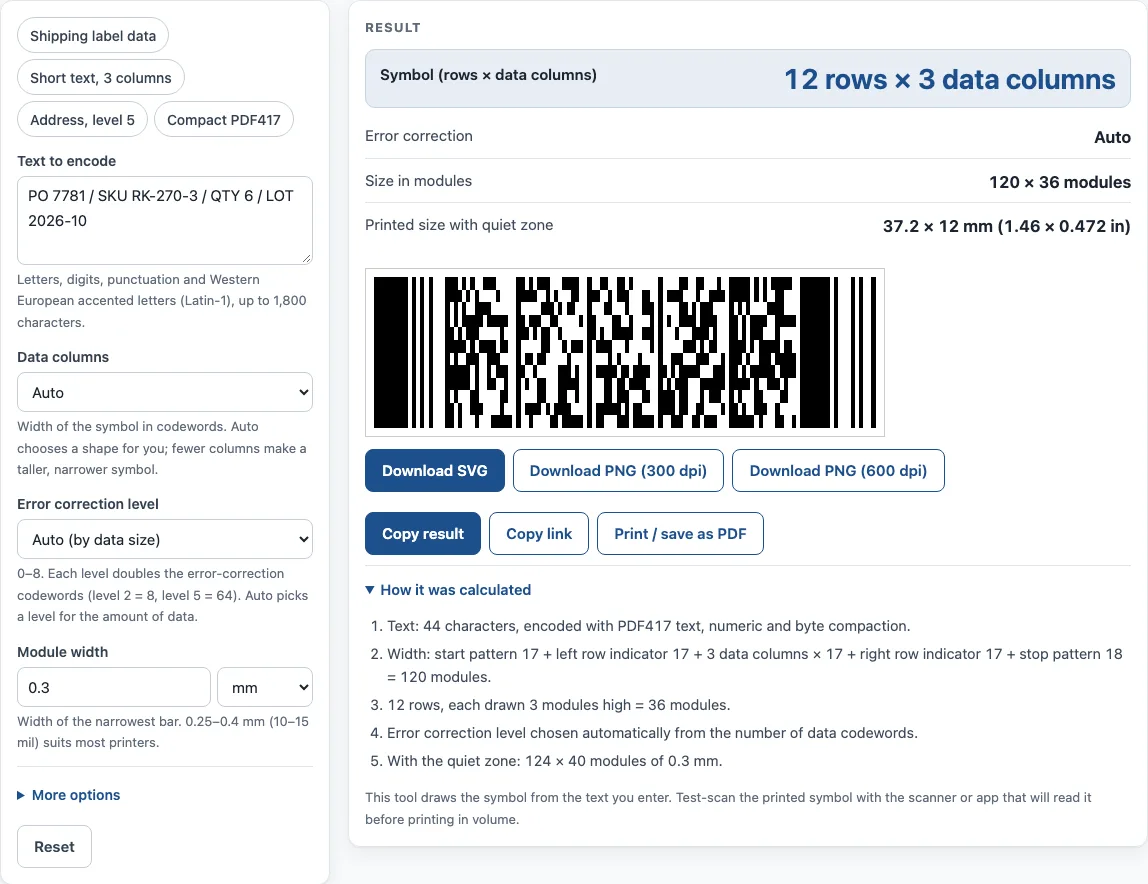
How to use the PDF417 Barcode Generator
- Type or paste your text into Text to encode. Use letters, digits, punctuation and Western European accented letters, up to 1,800 characters.
- Set Data columns. Leave it on Auto to let the tool choose a shape, or pick a number from 1 to 30. Fewer columns make a taller, narrower symbol.
- Set Error correction level. Leave it on Auto (by data size), or pick a level from 0 to 8.
- Set Module width in millimetres or mil. For most printers, 0.25 to 0.4 mm works well.
- Under More options you can tick Compact PDF417 for a narrower symbol in a clean environment, set the Row height (2 to 5 modules, 3 is the usual setting), keep the Quiet zone at 2 modules or more, and change the Dark color and Light color (hex such as #000000, or “none” for a transparent background).
- Check the result lines: symbol rows × data columns, size in modules, error correction and printed size with the quiet zone.
- Click Download SVG, Download PNG (300 dpi) or Download PNG (600 dpi).
The example buttons (Shipping label data, Short text 3 columns, Address level 5 and Compact PDF417) fill in sample settings so you can see how they work. Copy link keeps all your inputs in the page address, so opening the link restores the same result. Print / save as PDF prints your inputs, the result, the calculation steps and the date.
What is a PDF417 barcode?
A PDF417 barcode is a stacked linear barcode with several rows of bar-and-space codewords. The name stands for Portable Data File, and “417” means each codeword has 4 bars and 4 spaces across 17 modules. Ynjiun P. Wang created it at Symbol Technologies in 1991. It is defined in ISO/IEC 15438, and the format is public domain.
A symbol has between 3 and 90 rows and between 1 and 30 data columns, where each column holds one codeword per row. Every row starts with a start pattern and a left row indicator, then carries its data codewords, then ends with a right row indicator and a stop pattern. Because the data is spread over several rows, a PDF417 code holds far more information than a single-line barcode of similar width.
The format packs data with text, numeric and byte compaction modes. Numeric mode is the densest, fitting 44 digits into 15 codewords. Choosing the data columns controls the shape of the symbol, while the data itself decides which compaction mode is used.
How does PDF417 error correction work?
PDF417 uses Reed-Solomon error correction, which adds extra codewords so that a symbol can still be read when part of it is damaged, smudged or partly hidden. The error correction level sets how many extra codewords are added. The number of error-correction codewords is 2 to the power of (level + 1). Level 0 adds 2 codewords, level 2 adds 8, level 5 adds 64 and level 8 adds 512.
Higher levels make the symbol more tolerant of damage, but they also make it larger. Auto picks a level based on the size of your data, which suits most cases. Set a higher level when the code will be printed on a surface that may be scratched or worn, and a lower level when space is tight.
Sources
- ISO/IEC 15438 (PDF417; the standard’s text is not reproduced) and the public summary in Wikipedia: PDF417 — 3–90 rows, 1–30 columns, 17-module codewords, 2 to 512 error-correction codewords.
- Encoder: bwip-js 4.11.4 (MIT, includes BWIPP by Terry Burton). Every example on this page was printed and decoded with the independent open-source reader zxing-cpp.
Worked examples
| Input | Result |
|---|---|
| PO 7781 / SKU RK-270-3 / QTY 6 / LOT 2026-10 | 12 rows × 3 columns, Auto |
| Hello, PDF417! | 7 rows × 3 columns, Auto |
| SHIP TO: Lakeview Distribution LLC, 1900 D… | 20 rows × 6 columns, Level 5 (64 codewords) |
| Compact PDF417 0123456789 (compact) | 8 rows × 3 columns, Auto |
Calculated by the tool above with these values.
Frequently asked questions
Is this PDF417 generator free to use?
Yes. It is free, requires no sign-up and runs in your browser. Nothing you type is uploaded.
Can I use the generated PDF417 code on products and packaging?
Yes. Results may be used in commercial work, including on products, packaging and documents, with no attribution required.
Can I make a driver’s licence or ID barcode with this tool?
No. This tool does not make ID or driver’s licence barcodes. PDF417 is used on those documents in the US and Canada, but generating them is outside what this tool does.
Why won’t my PDF417 code scan with a 1D laser scanner?
A plain 1D laser scanner reads only one line, so it cannot read a stacked PDF417 code. Use a 2D imager, a phone app that reads PDF417, or a laser scanner that sweeps across the rows.
How big will my PDF417 code print?
Multiply the width in modules, plus the quiet zone on each side, by the module width. For “Hello, PDF417!” with 3 data columns, the symbol is 120 modules wide. With a 2-module quiet zone on each side, that is 124 modules, and at 0.3 mm per module it prints 37.2 mm wide.
Will the PNG file print at the size I chose?
Yes. The PNG files use whole pixels per module and include the print resolution, so they print at the size you set.
Related tools
- Data Matrix generator — a small 2D code for serial numbers, parts and GS1 healthcare labels.
- Aztec code generator — compact or full-range Aztec codes, SVG or PNG.
- Barcode generator — Code 128, Code 39, EAN, UPC, ITF-14, Codabar and GS1-128, single or a sheet of labels.
- Code 128 barcode generator — Code 128 with the code sets and check character worked out.
- GS1 barcode generator — GS1-128 labels with Application Identifiers, EAN-13 and ITF-14 carton codes.
- SSCC label generator — SSCC with check digit on a printable GS1 logistic label.