ISBN Barcode Generator for Books
Enter the ISBN and price to get the barcode for the back cover: EAN-13 with the ISBN above it and the price add-on.
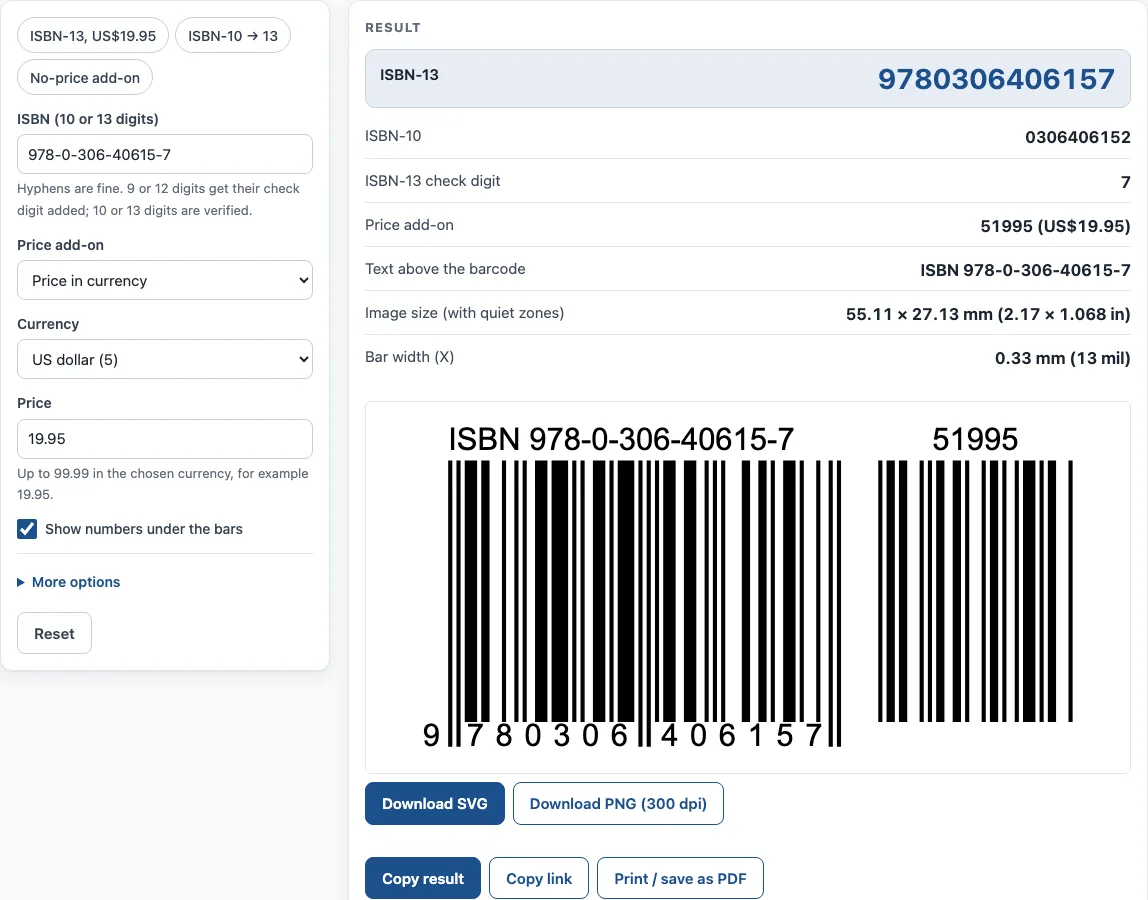
How to use the ISBN Barcode Generator
- In the ISBN (10 or 13 digits) field, type your ISBN-10 or ISBN-13. Hyphens are fine. Nine or 12 digits get their check digit added; 10 or 13 digits are verified.
- Choose a Price add-on: None, 90000 – no price stated, or Price in currency.
- If you chose Price in currency, pick a Currency (US or Canadian dollars) and enter a Price, such as 19.95. US prices can be US$0.01–99.98 or US$100.00–499.99; US$99.99 cannot be encoded.
- Use Show numbers under the bars to choose whether the human-readable digits appear.
- Set Size between 80 and 200 percent of nominal. With offset printing, 100% or less is normally enough.
- Use Keep quiet zones to add or remove the blank margins around the bars.
- Pick a PNG resolution of 300 dpi or 600 dpi, or use Download SVG for a vector file for your cover artwork.
- Read the result lines: ISBN-13, ISBN-10, ISBN-13 check digit, Text above the barcode, Price add-on, Image size (with quiet zones) and Bar width (X).
The example buttons ISBN-13, US$19.95; ISBN-10 → 13; and No-price add-on load sample values so you can see a result before entering your own. Under the result, Copy result copies the output, and Copy link produces a page address that restores all your inputs. Print / save as PDF prints the inputs, the result, the calculation steps and the date. The “How it was calculated” list shows each step using your own values.
How is an ISBN turned into a book barcode?
The barcode on a book is an EAN-13 symbol of the ISBN-13, usually called the “Bookland” EAN, with the human-readable ISBN printed above it. Every ISBN-13 starts with 978 or 979. Only 978 numbers have an ISBN-10 equivalent, so a 979 ISBN cannot be converted from an ISBN-10.
To convert an ISBN-10 to ISBN-13, add 978 in front, drop the old check digit, and calculate a new check digit. Multiply the digits alternately by 1 and 3, add the results, and subtract the total’s remainder from 10 (using 0 if the remainder is 0). For example, ISBN-10 0-306-40615-2 becomes ISBN-13 978-0-306-40615-7.
What does the 5-digit price add-on mean?
The optional five-digit price add-on sits to the right of the main barcode. Under the US book-industry guidelines (BISG, updated August 2025), a leading 5 marks a US dollar price and the next four digits are the price in cents: 50001 to 59998 cover US$0.01 to US$99.98, so 51995 means US$19.95. 59999 means the price is not encoded and is above US$99.98, so US$99.99 itself cannot be encoded. Prices from US$100.00 to US$499.99 are written in full as 10000 to 49999. The code 90000 means no price is encoded. In Canada, BookNet Canada notes that a leading 6 marks a Canadian dollar price, though it is not widely used.
The add-on is optional, but BISG notes that some publishers and retailers require it, so publishers who do not want to encode a price use 90000. The tool offers US and Canadian dollars only, because published lists of other currency digits do not agree.
Where does the barcode go on a book?
Under the BISG guidelines, the barcode is printed at the bottom of the back cover (cover 4). Bars must be the darker colour, normally black or dark blue, on a light background with no blue or black in it. Magnification may be anywhere from 80% to 200%, and with offset printing more than 100% should not be needed; barcodes on the inside front cover of strippable mass-market paperbacks must be at least 90%. Leave the blank quiet zones around the bars, and do not shorten the bars (truncation), which can cause non-reads. Test-scan a printed proof before the print run.
How is the ISBN-10 check digit calculated?
The ISBN-10 check digit uses the first nine digits, each multiplied by a weight from 10 down to 2. Add the products and divide by 11. The check digit is 11 minus the remainder; a result of 10 is written as X and a result of 11 as 0. For example, the digits 0-8044-2957 give a check digit of X, so the full number is 0-8044-2957-X.
Sources
- BISG Barcoding Guidelines for the U.S. Book Industry (updated August 2025) — placement, 80–200% size, price add-on values, 90000.
- BookNet Canada on barcode price extensions (September 2025) — the leading 6 for Canadian dollar prices.
- ISBN Users’ Manual, 7th edition (International ISBN Agency) — ISBN-10 and ISBN-13 check digits and conversion.
Worked examples
| Input | Result |
|---|---|
| 978-0-306-40615-7 + price add-on | ISBN-13 9780306406157, 55.11 × 27.13 mm (2.17 × 1.068 in) |
| 0-306-40615-2 | ISBN-13 9780306406157, 37.29 × 27.13 mm (1.468 × 1.068 in) |
| 0-8044-2957-X + price add-on | ISBN-13 9780804429573, 55.11 × 27.13 mm (2.17 × 1.068 in) |
| 978-3-16-148410-0 + price add-on | ISBN-13 9783161484100, 55.11 × 27.13 mm (2.17 × 1.068 in) |
| 9780306406157 | ISBN-13 9780306406157, 29.83 × 21.71 mm (1.174 × 0.855 in) |
Calculated by the tool above with these values.
Frequently asked questions
Is this isbn barcode generator free to use?
Yes. The tool is free and needs no sign-up. It runs in your browser, and nothing you type is uploaded.
Can I use the barcode I create on my book or product?
Results may be used in commercial work, including products, packaging and documents, with no attribution. Book barcodes are printed at the bottom of the back cover, dark bars on a light background, at 80–200% size (BISG).
Does this tool give me an ISBN?
No. ISBNs are assigned by national agencies, such as Bowker in the US and Nielsen in the UK and Ireland. You need an ISBN before you create a barcode for a book.
What does 90000 mean in the price add-on?
It means no price is encoded. BISG recommends 90000 when a publisher is not encoding the US dollar cover price; some US retailers require a price add-on, so check with your trading partners.
What happens if I type 9 or 12 digits?
The tool adds the check digit for you. If you type 10 or 13 digits, it verifies the check digit instead.
Why does the tool keep my hyphens?
Hyphen positions depend on the registration group and publisher range, so the tool keeps the hyphens as you type them.
Related tools
- UPC barcode generator — UPC-A and UPC-E barcodes for retail products, with add-ons and GS1 sizes.
- UPC check digit calculator — get or verify the check digit of a UPC, EAN, GTIN-14, GLN or SSCC.
- Barcode generator — Code 128, Code 39, EAN, UPC, ITF-14, Codabar and GS1-128, single or a sheet of labels.
- GS1 barcode generator — GS1-128 labels with Application Identifiers, EAN-13 and ITF-14 carton codes.
- Data Matrix generator — a small 2D code for serial numbers, parts and GS1 healthcare labels.
- Schedule B lookup — find the 10-digit US export code for an AES filing.