GTIN Generator
Enter your GS1 company prefix and a starting item number to get a list of GTINs with their check digits.
The GTIN Generator creates a list of Global Trade Item Numbers (GTINs) from a GS1 Company Prefix that you already hold. You choose the GTIN type (GTIN-13, GTIN-12 or GTIN-14), enter your prefix and a starting item reference, and the tool calculates each check digit and lists the numbers in order. It runs in your browser, is free, and needs no sign-up.
A GTIN identifies a product, and the barcode on most retail packs carries it. The tool does the arithmetic for you, so you can see the first and last numbers in a range, how many item references your prefix allows, and how many are left after your list. It does not license GTINs or register products.
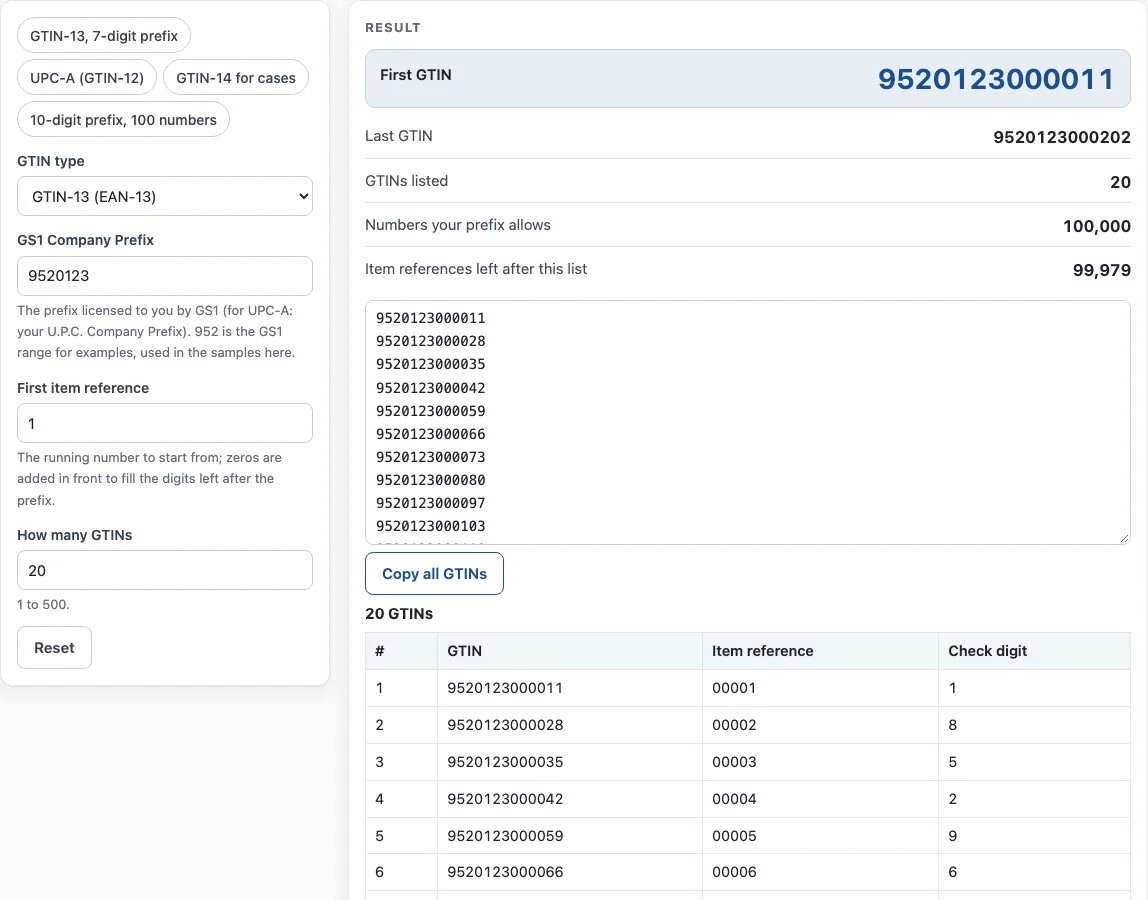
How to use the GTIN Generator
- Open the GTIN type menu and pick GTIN-13 (EAN-13), GTIN-12 (UPC-A) or GTIN-14 (cases, ITF-14).
- Type your GS1 Company Prefix in the field. For UPC-A, use your U.P.C. Company Prefix. If you are only testing, 952 is the prefix reserved for examples.
- For GTIN-14 only, enter the Indicator digit (1–8). Use a different indicator for each packaging level of the same item, for example 1 for one case size and 2 for another.
- Enter the First item reference. This is the running number to start from. Zeros are added in front to fill the remaining digits.
- Enter How many GTINs you need, from 1 to 500.
- Read the result lines: First GTIN, Last GTIN, GTINs listed, Numbers your prefix allows and Item references left after this list.
- Check the How it was calculated list to see the steps with your own values.
You can use the example buttons (GTIN-13 with a 7-digit prefix, UPC-A, GTIN-14 for cases, or a 10-digit prefix with 100 numbers) to see how each type behaves. Copy result copies the output. Copy link saves the page address with all your inputs, so opening it later restores the same result. Print / save as PDF prints your inputs, the result, the calculation steps and the date.
How is a GTIN made up?
A GTIN is built from three parts: a GS1 Company Prefix licensed to the brand owner, an item reference that the company assigns, and a final check digit. The check digit lets scanners and software catch typing and reading errors. The three types differ only in how many digits they use.
For GTIN-13, the company prefix and item reference together make 12 digits, and the check digit makes 13. For GTIN-12 (UPC-A), the U.P.C. Company Prefix and item reference make 11 digits, and the check digit makes 12. For GTIN-14, an indicator digit (1–8) goes in front of the 12 digits of a GTIN-13 body, and a new check digit is added at the end. The indicator marks packaging levels of the same item, such as a case.
How do you calculate a GTIN check digit?
Start from the right of the digits without the check digit. Multiply each digit alternately by 3 and by 1, moving leftward, so the rightmost digit is multiplied by 3. Add all the results. Then take (10 − sum mod 10) mod 10. That final value is the check digit, and it is 0 if the sum is already a multiple of 10.
GS1’s sample GTIN-12 shows the method. The body 61414123456 comes from U.P.C. Company Prefix 614141 and item reference 23456. Working from the right, the products are 18, 5, 12, 3, 6, 1, 12, 1, 12, 1 and 18. Their sum is 89. Since 89 mod 10 is 9, the check digit is 10 − 9 = 1, which gives 614141234561.
Why does a longer company prefix mean fewer GTINs?
The company prefix and item reference share a fixed number of digits, so every digit used by the prefix is a digit taken away from the item references. A 7-digit prefix leaves 5 digits for item references, which gives 100,000 GTIN-13s. A 10-digit prefix leaves 2 digits, which gives only 100. The tool’s “Numbers your prefix allows” line shows this count for your prefix.
Which GTIN type should you choose?
Choose the type that matches how the product is sold and scanned. GTIN-13 and GTIN-12 are the retail numbers carried by EAN-13 and UPC-A barcodes, and the one you get depends on the prefix your GS1 office licensed. GTIN-14 is used for cases and other packaging levels, and it carries an indicator digit so a case can have a different number from the single unit inside it.
A GTIN should be allocated to one product only. Create a new GTIN when the product changes in a way that customers or trading partners need to tell apart, such as a different size or pack count.
Sources
- GS1 Company Prefix list (read 12 October 2026) — 952 for demonstrations and examples; 02x, 04x, 2xx restricted circulation; 977–979 ISSN/ISBN; implied leading zero of 12-digit GTINs.
- GS1 General Specifications 7.9 — check digit calculation; GS1’s sample GTIN-12 614141234561 is reproduced in the tests.
Worked examples
| Input | Result |
|---|---|
| GTIN-13 (EAN-13), prefix 9520123, from 1, 20 numbers | 9520123000011 … 9520123000202 (100,000 possible) |
| GTIN-12 (UPC-A), prefix 614141, from 0, 10 numbers | 614141000005 … 614141000098 (100,000 possible) |
| GTIN-14 (cases, ITF-14), prefix 9520123, from 1, 5 numbers | 19520123000018 … 19520123000056 (100,000 possible) |
| GTIN-13 (EAN-13), prefix 9520123456, from 95, 10 numbers | 9520123456955 … 9520123456993 (100 possible) |
Calculated by the tool above with these values.
Frequently asked questions
Is the GTIN Generator free to use?
Yes. It runs in your browser, is free, and needs no sign-up. Nothing you type is uploaded.
Can I use the GTINs on my products?
Yes, if the prefix is one licensed to you: the list is yours to use, with no attribution. The tool does not license numbers itself.
What is the difference between a GTIN and a GS1 Company Prefix?
The GS1 Company Prefix is the number licensed to your company by GS1. A GTIN is a complete product number made from that prefix, an item reference you assign, and a check digit.
Why does my result show fewer numbers than I expected?
Your prefix fixes how many item references are available. A longer prefix leaves fewer digits for item references, so the count of numbers your prefix allows goes down. Check the “Numbers your prefix allows” line.
Does this tool register my product with GS1?
No. The tool only lists numbers from a prefix you already hold. Registration and licensing are handled through GS1.
Can I copy the GTINs into a spreadsheet?
Yes. Click Copy all GTINs to copy the list one number per line, then paste it into a spreadsheet column. Up to 500 numbers can be listed at a time.
Related tools
- UPC check digit calculator — get or verify the check digit of a UPC, EAN, GTIN-14, GLN or SSCC.
- UPC barcode generator — UPC-A and UPC-E barcodes for retail products, with add-ons and GS1 sizes.
- GS1 barcode generator — GS1-128 labels with Application Identifiers, EAN-13 and ITF-14 carton codes.
- SSCC label generator — SSCC with check digit on a printable GS1 logistic label.
- Random barcode generator — random EAN, UPC, ITF-14 or Code 128 test barcodes with valid check digits.
- ISBN barcode generator — the EAN-13 barcode for a book cover, with the ISBN text and price add-on.