GS1 Barcode Generator (GS1-128, EAN-13, ITF-14)
Type GS1 element strings like (01)…(17)…(10)… or a GTIN to get a GS1-128, EAN-13 or ITF-14 barcode with every check digit verified.
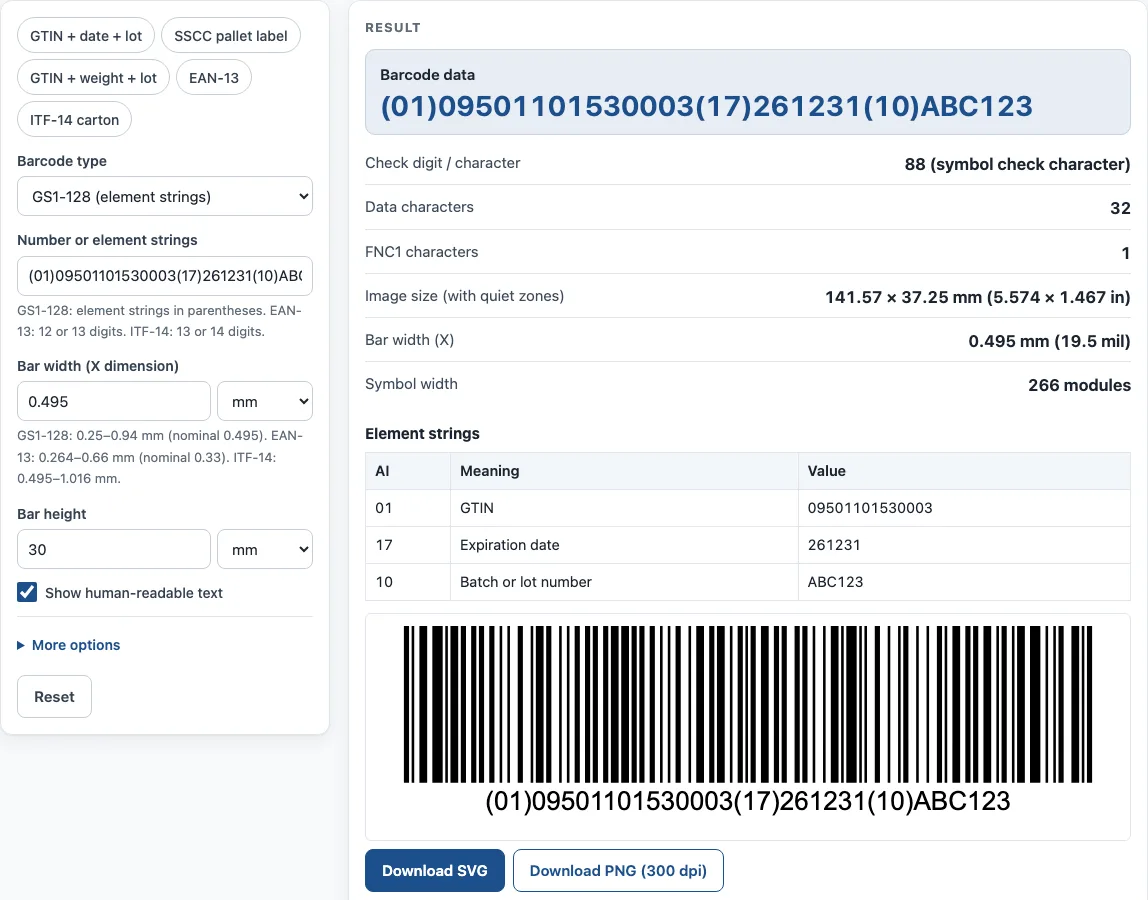
How to use the GS1 Barcode Generator
- Choose a value in the Barcode type field: GS1-128 (element strings), EAN-13, or ITF-14 (cartons).
- Type your data in the Number or element strings field. For EAN-13, enter 12 or 13 digits. For ITF-14, enter 13 or 14 digits. For GS1-128, write each element string with its Application Identifier in parentheses, such as (01) followed by a 14-digit GTIN.
- Set Bar width (X dimension). The help text gives the ranges: GS1-128 0.25–0.94 mm (nominal 0.495), EAN-13 0.264–0.66 mm (nominal 0.33), and ITF-14 0.495–1.016 mm.
- Set Bar height.
- Choose a Bearer bars option: Frame all around, Top and bottom bars, or None. ITF-14 cartons use a bearer bar to protect against misreads.
- Turn Show human-readable text and Keep quiet zones (blank margins) on or off.
- Pick a PNG resolution: 300 dpi or 600 dpi.
- Read the result: barcode data, check digit / character, data characters, FNC1 characters, image size (with quiet zones), bar width (X), and symbol width. The How it was calculated list shows each step with your own values.
To start faster, use an example button: GTIN + date + lot, SSCC pallet label, GTIN + weight + lot, EAN-13, or ITF-14 carton. Under the result, Copy result copies the output, and Copy link saves a page address that restores all your inputs. Print / save as PDF prints the inputs, result, calculation steps and date.
What is a GS1 barcode?
A GS1 barcode is a barcode built to the GS1 General Specifications, the rules published by GS1 for retail and logistics. Each GS1 number starts with a company prefix that GS1 issues, so two businesses do not end up with the same product number.
EAN-13 is the GS1 barcode used for retail products at point of sale. It carries a 13-digit GTIN-13. UPC-A is its 12-digit North American form. Every GTIN, SSCC and GLN ends with a check digit calculated with the mod-10 method. You multiply the digits from the right, alternating weights of 3 and 1, add the results, and take the amount needed to reach the next multiple of 10.
For example, take 400638133393. From the right, the digits are weighted 3, 1, 3, 1 and so on. The weighted sum is 89, and 10 − 9 = 1. The full EAN-13 is 4006381333931. The tool runs this check for you.
Which GS1 barcode type should I choose?
Choose GS1-128 for logistics labels such as pallet labels, SSCC labels and cases. It is a Code 128 barcode that starts with the special character FNC1 and carries GS1 element strings. Each piece of data has an Application Identifier (AI) in brackets, such as (17) for an expiry date in YYMMDD form or (10) for a batch or lot. The brackets are not encoded; they appear only in the human-readable text. A variable-length field such as (10) or (21) ends with an FNC1 separator when more data follows, while fixed-length AIs need no separator. GS1-128 is limited to 48 data characters and 165 mm in width.
Choose ITF-14 for a 14-digit GTIN printed on corrugated cartons. Its bearer bar, either a frame or top and bottom bars, helps protect the symbol against misreads. GS1 recommends an X dimension from 0.495 mm to 1.016 mm for ITF-14 on cartons.
Choose EAN-13 for a retail product that will be scanned at a checkout.
Sources
- GS1 General Specifications — GS1-128 (FNC1, 48 characters, 165 mm), EAN-13 and ITF-14.
- GS1 Barcode Syntax Dictionary (downloaded 11 October 2026) — length and character set of every Application Identifier; the tool’s AI table is tested against it.
- GS1 UK: GS1-128 size in general distribution and GS1 Sweden size guide — ITF-14 X dimension 0.495–1.016 mm.
- GS1 check digit calculation
Worked examples
| Input | Result |
|---|---|
| GS1-128 (element strings): (01)09501101530003(17)261231(10)ABC123 | (01)09501101530003(17)261231(10)ABC123, 141.57 × 37.25 mm (5.574 × 1.467 in) |
| GS1-128 (element strings): (00)106141411234567897 | (00)106141411234567897, 87.12 × 37.25 mm (3.43 × 1.467 in) |
| EAN-13: 4006381333931 | 4006381333931, 37.31 × 24.55 mm (1.469 × 0.967 in) |
| ITF-14 (cartons): 15400141288763 | 15400141288763, 167.13 × 48.9 mm (6.58 × 1.925 in) |
| GS1-128 (element strings): (01)09501101530003(3103)000500(10)LOT42 | (01)09501101530003(3103)000500(10)LOT42, 141.57 × 37.25 mm (5.574 × 1.467 in) |
Calculated by the tool above with these values.
Frequently asked questions
Is this GS1 barcode generator free to use?
Yes. It is free and needs no sign-up. Everything runs in your browser, and nothing you type is uploaded.
Can I use the barcodes on products and packaging?
Yes. Results may be used in commercial work, including on products, packaging and documents, with no attribution required. The numbers themselves must still come from your own GS1 company prefix.
Where do I get the numbers for a barcode?
Numbers must come from your GS1 company prefix, which GS1 issues. This tool draws the symbol from the numbers you enter, but it does not issue them.
Why does my GS1-128 barcode text show brackets?
The Application Identifiers are shown in brackets in the human-readable text, such as (01) or (10). The brackets are not encoded in the barcode itself, so scanners read the data without them.
Does the tool check my numbers?
It checks the check digit on GTINs, SSCCs and GLNs, which are calculated with the mod-10 method. Make sure the length matches the barcode type: 12 or 13 digits for EAN-13, and 13 or 14 digits for ITF-14.
Does the tool send my data anywhere?
No. Everything runs in your browser, so nothing you type is uploaded.
Related tools
- UPC check digit calculator — get or verify the check digit of a UPC, EAN, GTIN-14, GLN or SSCC.
- Data Matrix generator — a small 2D code for serial numbers, parts and GS1 healthcare labels.
- UPC barcode generator — UPC-A and UPC-E barcodes for retail products, with add-ons and GS1 sizes.
- Barcode generator — Code 128, Code 39, EAN, UPC, ITF-14, Codabar and GS1-128, single or a sheet of labels.
- Container check digit calculator — check the ISO 6346 check digit of a shipping container number.
- HTS code lookup — find the US import classification number and its duty rates.
- UNLOCODE lookup — find the code of a port, airport or terminal for a booking or bill of lading.