FNSKU Label Generator (Code 128, Avery 5160)
Paste your FNSKUs to get print-ready Code 128 labels, 30 to a sheet or one per thermal label.
The FNSKU Label Generator turns a list of FNSKUs into Code 128 barcode labels, laid out on a Letter sheet or as single thermal labels. Paste one FNSKU per line, choose your label stock, and the page previews every sheet before you download or print. It runs in your browser, is free, and needs no sign-up. Nothing you type is uploaded.
Each label shows the FNSKU as a Code 128 barcode with the FNSKU printed under the bars. You can add the product title above the barcode and a condition word, New or Used, below it. The tool is useful when you need fnsku labels for a batch of products and want them done in one run.
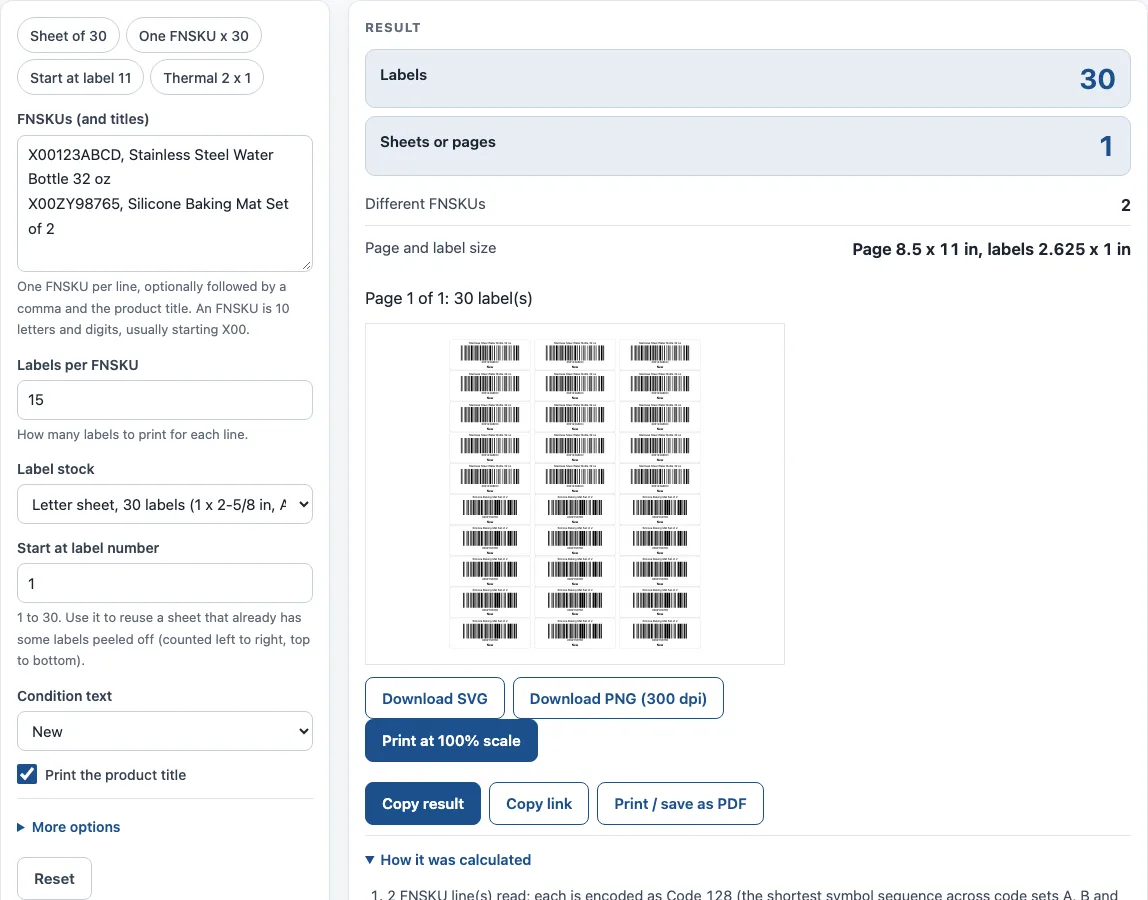
How to use the FNSKU Label Generator
- Type or paste your FNSKUs into FNSKUs (and titles), one per line. To add a title, put a comma after the FNSKU and type the product title.
- Set Labels per FNSKU to the number of labels you need for each line. The range is 1 to 600, and a single run allows at most 600 labels.
- Choose Label stock: Letter sheet with 30 labels, Thermal roll 2 x 1 in, or Thermal roll 3 x 1 in.
- If you are reusing a partly used Letter sheet, set Start at label number from 1 to 30. Labels are counted left to right, top to bottom.
- Pick a Condition text option (None, New or Used). Tick Print the product title if you want titles on the labels. Titles longer than about 38 characters are cut to fit.
- Read the result lines (Labels, Sheets or pages, Different FNSKUs, Page and label size) and any warnings.
- Check the preview, then use Download SVG or Download PNG (300 dpi) for a page, or Print at 100% scale to print every page.
The example buttons (Sheet of 30, One FNSKU x 30, Start at label 11, Thermal 2 x 1) fill the inputs for you. Under More options, you can change the narrowest bar width (default 0.33 mm) and the PNG resolution (203 or 300 dpi). Copy link keeps all your inputs in the address, so opening it restores the same result. Print / save as PDF includes the inputs, the result, the calculation steps and the date.
What is an FNSKU?
An FNSKU is the identifier Amazon assigns to each item for fulfilment. It is 10 letters and digits, usually starting with X00, and some sources also mention FNSKUs that start with B0 when the ASIN is used. This tool does not create or assign FNSKUs; it turns the ones you already have into labels.
The label is what makes the FNSKU scannable. Third-party seller guides say the label must fully cover any existing barcode on the package, so that only the FNSKU scans.
Why does an FNSKU label need a quiet zone and a test scan?
A scanner reads the bars by finding blank space on both sides of them, so a label with text, a border or the edge of the sticker too close to the barcode may fail to scan. Printers also differ: a thin bar that looks fine on screen can blur on a small inkjet or laser printer. Print one sheet at 100% scale, scan a label with the scanner you will use, and only then print the full batch.
What barcode type is an FNSKU?
Seller guides describe an FNSKU label as a Code 128 barcode with the FNSKU written under the bars. Code 128 builds each symbol character from 11 modules. Each barcode also has a 13-module stop and a 10-module quiet zone on each side. The quiet zone is the blank margin a scanner needs to find the start and end of the code, so keep other print away from it.
The optional product title sits above the barcode, and the condition word sits below it. If the bars come out too thin for a desktop printer, the tool shows a warning. You can adjust the narrowest bar width under More options; the default is 0.33 mm (13 mil).
Seller guides commonly recommend 1 x 2-5/8 in labels, 30 to a sheet (Avery 5160 / 8160), or 2 x 1 in thermal labels. On the Avery 5160 layout, each label is 2.625 x 1 in, arranged in 3 columns and 10 rows. The sheet has 0.1875 in side margins, 0.5 in top and bottom margins, and 0.125 in between columns, with no gap between rows. That gives 30 labels on 8.5 x 11 in paper.
Worked examples
| Input | Result |
|---|---|
| X00123ABCD × 15, avery5160 | 30 labels on 1 page(s) |
| X00ABC1234 × 30, avery5160 | 30 labels on 1 page(s) |
| X00123ABCD × 2, thermal2x1 | 4 labels on 4 page(s) |
| X00123ABCD × 10, avery5160 | 20 labels on 1 page(s) |
Calculated by the tool above with these values.
Frequently asked questions
What size is an FNSKU label?
The common Letter-sheet option is 1 x 2-5/8 in, with 30 labels per sheet (Avery 5160 / 8160). For thermal printers, the tool offers 2 x 1 in and 3 x 1 in rolls. Choose the option that matches the labels you have loaded.
How do I print FNSKU labels?
Set your label stock, check the preview, then click Print at 100% scale. Use 100% scale rather than “fit to page”, which can resize the barcode. Scan one printed label before you print a full batch.
Can I print FNSKU labels on a thermal printer?
Yes. Choose either Thermal roll 2 x 1 in or Thermal roll 3 x 1 in, then print at 100% scale. The Start at label number setting applies only to the Letter sheet.
Do I need to check Amazon’s requirements before printing?
Yes. Amazon’s own Seller Central help pages could not be read for this page, so the exact current requirements were not verified here. Check them in Seller Central before a large print run.
Can I use these labels on products I sell?
Yes. Results may be used in commercial work, such as labels on your products, with no attribution required.
Does the tool keep what I type?
No. Everything runs in your browser, and nothing you type is uploaded.
Related tools
- Code 128 Barcode Generator — a Code 128 barcode for anything other than an FNSKU
- SSCC Label Generator (GS1 Logistic Label) — labels for shipping cartons or pallets rather than single products
- Barcode Generator — other barcode types for general labelling
- Barcode Types Chooser (1D vs 2D) — compare Code 128 with other barcode types for your data and label size
- UPC Barcode Generator — retail UPC-A and UPC-E symbols for items sold at a checkout
- GTIN Generator — a list of GTINs with check digits from your GS1 company prefix