Data Matrix Generator (ECC 200 and GS1 DataMatrix)
Type text or GS1 element strings to get a Data Matrix code in the smallest size, with SVG and PNG downloads at print size.
A Data Matrix generator is a free tool that turns text or GS1 data into a Data Matrix code, a square 2D barcode that holds a lot of information in a small space. This generator makes ECC 200 symbols, the version in current use. It runs entirely in your browser, nothing you type is uploaded, and there is no sign-up.
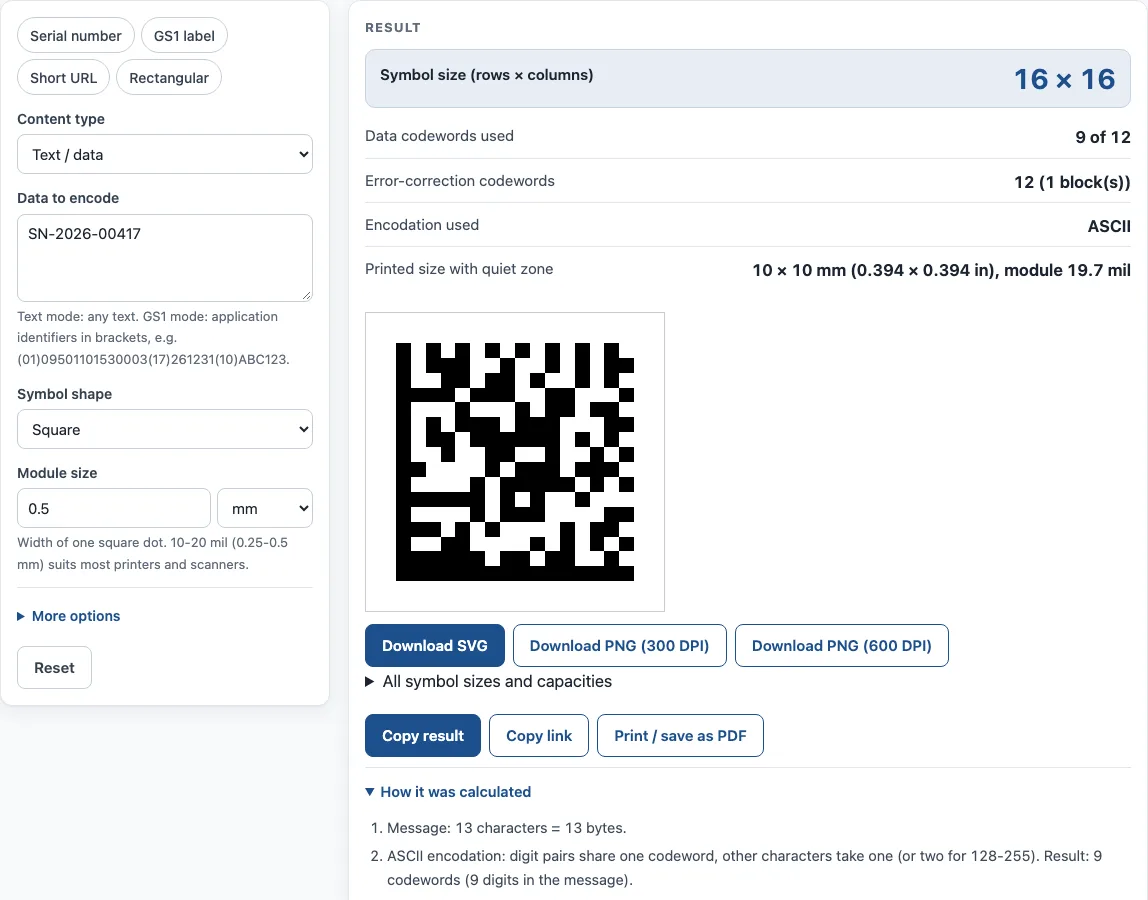
Enter your data, choose a shape or size, and the result shows the symbol size, the codewords used, and the printed size with its quiet zone. Use it as a data matrix code generator for plain text such as serial numbers, or as a GS1 data matrix generator when your label needs Application Identifiers. Download the code as SVG or as PNG at 300 or 600 DPI for labels, packaging, documents and small parts.
How to use the Data Matrix Generator
- Choose a Content type. Pick Text / data for any text, or GS1 element string for labels that use Application Identifiers.
- Type your content into Data to encode. In GS1 mode, put each identifier in brackets, for example (01)09501101530003(17)261231(10)ABC123. You can also click an example button: Serial number, GS1 label, Short URL or Rectangular.
- Set Symbol shape to Square, Rectangular or Smallest of either.
- Set Symbol size to Auto (smallest), or pick a fixed size. A fixed size overrides the shape.
- Leave Encodation on Auto unless you need a specific mode.
- Set Module size to the width of one dot, and Quiet zone (modules) to at least 1.
- Enter Dark color and Light color as hex values. Type “none” in Light color for a transparent background.
- Read the result: symbol size, data codewords used, error-correction codewords, encodation used, and printed size with quiet zone.
Use Copy result to copy the result text. Copy link copies a page address that keeps all your inputs, so opening it restores the same result. Print / save as PDF prints your inputs, the result, the calculation steps and the date, which gives you a record of how a code was made. The “How it was calculated” list shows each step with your own values.
What is a Data Matrix code?
A Data Matrix code is a 2D barcode made of square dots called modules, arranged in a square or rectangular grid. It is specified in ISO/IEC 16022, and the version in use today is ECC 200. Every symbol has an L-shaped solid border, the finder pattern, along two sides, and alternating dark and light modules, the timing pattern, along the other two. A scanner uses these to locate the grid and measure the module size.
The code also protects its own data. ECC 200 uses Reed-Solomon error correction, so a symbol can still be decoded when part of it is scratched, smudged or printed poorly. The result shows how many error-correction codewords were added, so you can see how much of the symbol is protection and how much is data. Symbols run from 10×10 to 144×144 modules in 24 square sizes, plus 6 rectangular sizes from 8×18 to 16×48.
How does a Data Matrix generator choose the size and encoding?
When Symbol size is set to Auto, the generator picks the smallest symbol that holds your data. It counts the codewords the data needs, then selects a symbol with enough room for the data and its error correction. A fixed size overrides the shape you chose, so the symbol can be larger than the data needs.
Encodation is the method that turns characters into codewords. ASCII packs two digits into each codeword, which keeps long number strings compact. C40 and Text pack three characters into two codewords. C40 handles upper-case text, and Text handles upper- and lower-case. Base 256 stores any bytes, so it suits binary data or characters outside those sets. With Auto, the tool picks whichever mode needs the fewest codewords.
GS1 DataMatrix starts with an FNC1 character and uses ASCII. Each Application Identifier tells a reader what the value means: (01) for the GTIN, (17) for the expiry date, (10) for the batch and (21) for the serial number. Many healthcare and pharmaceutical packs require this format. For example, US DSCSA and EU FMD serialisation use GS1 DataMatrix.
Sources
- ISO/IEC 16022 (Data Matrix ECC 200; the standard’s text is not reproduced). Every symbol size and encodation mode was decoded with the independent open-source decoder zxing-cpp.
- GS1 DataMatrix Guideline and the GS1 Barcode Syntax Dictionary (downloaded 11 October 2026) — FNC1 and Application Identifier lengths.
- Commission Delegated Regulation (EU) 2016/161 (EU FMD, Data Matrix on medicine packs) and 21 U.S.C. 360eee (DSCSA product identifier in a 2-dimensional data matrix barcode).
Worked examples
| Input | Result |
|---|---|
| 123456 | 10 × 10 symbol, 3 of 3 codewords, ASCII |
| HELLO WORLD 2026 | 18 × 18 symbol, 13 of 18 codewords, C40 |
| GS1 (01)09501101530003(17)261231(10)ABC123 | 20 × 20 symbol, 19 of 22 codewords, ASCII |
| https://example.com/p/48213?lot=7 | 22 × 22 symbol, 30 of 30 codewords, Text |
| PN 4471-A QTY 250 | 12 × 26 symbol, 14 of 16 codewords, ASCII |
Calculated by the tool above with these values.
Frequently asked questions
Is this matrix code generator free for commercial use?
Yes. The tool is free with no sign-up, and results may be used on products, packaging and documents with no attribution.
What is the difference between a Data Matrix and a QR code?
Both are 2D codes, but Data Matrix is more compact for short data and is the GS1 standard for healthcare. QR codes are more common for consumer web links.
Can a phone scan a Data Matrix code?
Yes, a phone camera can read it. A 2D code needs a camera-based (imager) scanner, because a laser scanner cannot read it.
What is the largest Data Matrix symbol?
The largest is 144×144 modules. It holds up to 3,116 digits, 2,335 alphanumeric characters or 1,555 bytes.
Will the printed code be the size I chose?
Yes. The PNG files are made with whole pixels per module and include the print resolution, so they print at the chosen module size. Check the printed size line in the result before you send the file to a printer.
Do I need GS1 mode to make a GS1 DataMatrix?
Yes. Choose GS1 element string as the content type and enter each Application Identifier in brackets. Text / data mode does not add the GS1 structure that scanners and healthcare systems expect.
Related tools
- GS1 barcode generator — GS1-128 labels with Application Identifiers, EAN-13 and ITF-14 carton codes.
- Barcode generator — Code 128, Code 39, EAN, UPC, ITF-14, Codabar and GS1-128, single or a sheet of labels.
- UPC check digit calculator — get or verify the check digit of a UPC, EAN, GTIN-14, GLN or SSCC.
- UPC barcode generator — UPC-A and UPC-E barcodes for retail products, with add-ons and GS1 sizes.
- ISBN barcode generator — the EAN-13 barcode for a book cover, with the ISBN text and price add-on.
- Container check digit calculator — check the ISO 6346 check digit of a shipping container number.