Container Check Digit Calculator (ISO 6346)
Enter the owner code, category and serial number to get the check digit, or a full container number to check it.
The Container Check Digit Calculator works out the check digit for a shipping container number, or checks a full 11-character number to confirm that its last digit is correct. It uses the ISO 6346 method that applies to container numbers on bills of lading, booking forms and gate-in records. Everything runs in your browser, so nothing you type is uploaded. The tool is free and needs no sign-up.
You can check one number at a time or a whole list. Enter 10 characters to get the check digit, or all 11 to validate the number. The tool ignores spaces and hyphens, so you can paste a number exactly as it is printed.
The check digit is the final character of the container number. A typing mistake in any of the other ten characters will usually change it, which makes the calculator useful before a number goes onto a document.
How to use the Container Check Digit Calculator
- Open the Mode setting. Choose One number to check a single container, or Many numbers (table) to check a list.
- For one number, type the value into the Container number field. Enter 10 characters (a 3-letter owner code, the category letter U, J or Z, and a 6-digit serial number) to get the check digit. Enter all 11 characters to validate a number that already has a check digit.
- For a list, choose Many numbers (table) and paste your numbers into the Container numbers field. Put one number on each line, or separate them with commas. Each entry should be 10 or 11 characters.
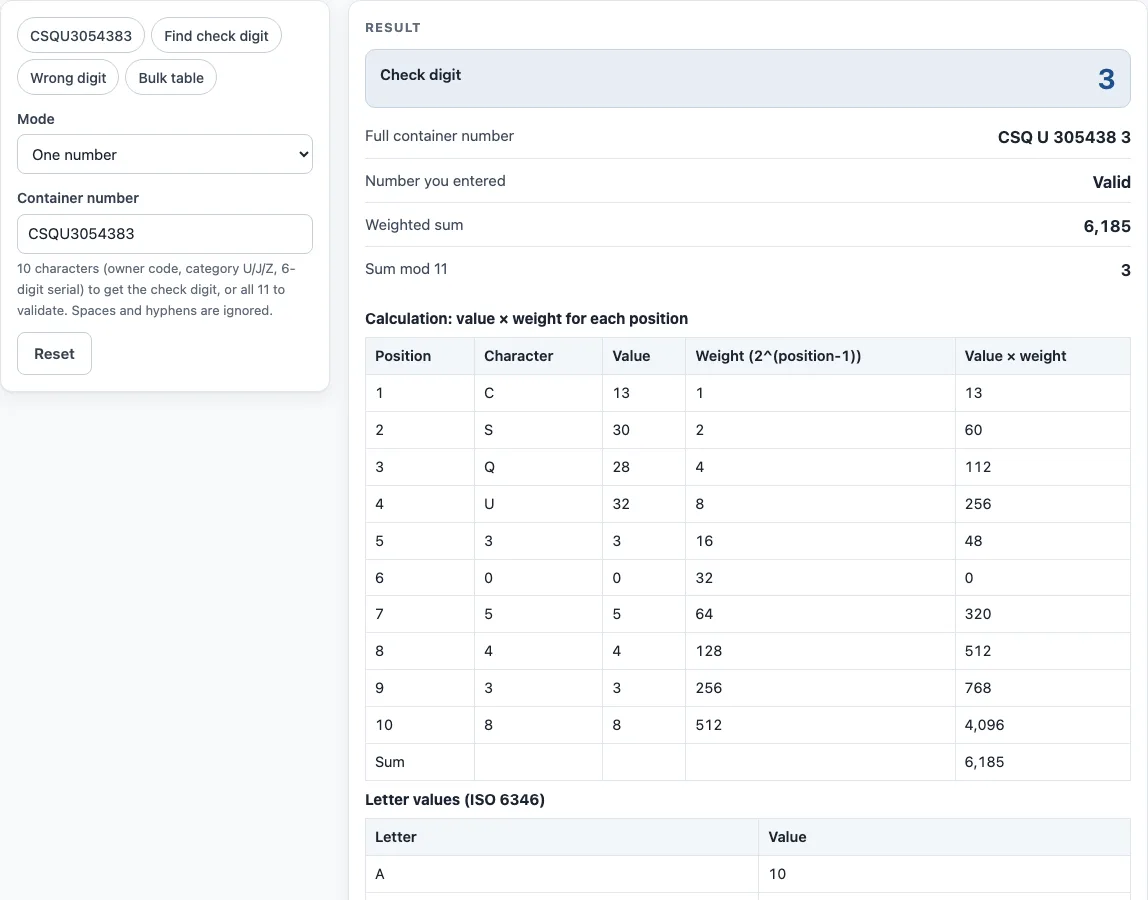
- Read the result. The Check digit and Full container number lines show the answer for a 10-character entry. The Number you entered line repeats your input, and the Weighted sum and Sum mod 11 lines show the working. The Result line gives the overall outcome.
- To try the tool first, press an example button. CSQU3054383 loads a valid number, Wrong digit loads a number with an incorrect check digit, Find check digit runs the calculation for a 10-character entry, and Bulk table loads a sample list.
Under the result, Copy result copies the output, and Copy link copies a page address that keeps all your inputs, so opening it restores the same result. Print / save as PDF prints your inputs, the result, the calculation steps and the date.
What is the check digit in a container number?
The check digit is the 11th and final character of an ISO 6346 shipping container number. It is calculated from the first 10 characters, so anyone with the rest of the number can work it out. The number is made up of a 3-letter owner code, an equipment category letter (U for freight containers, J for detachable freight-container-related equipment, Z for trailers and chassis), a 6-digit serial number and the check digit.
An example is CSQU 305438 3. Owner codes are registered with the Bureau International des Containers (BIC). The check digit is often printed in a box on the container door.
How is the container check digit calculated?
Each character gets a number value, and the values are weighted, added and divided by 11. The remainder is the check digit. Digits keep their own value. Letters are valued as follows: A = 10, then counting upward but skipping 11, 22 and 33, so B = 12 up to K = 21, L = 23 up to U = 32, and V = 34 up to Z = 38.
Next, multiply the value in each position from 1 to 10 by 2 raised to the power of (position minus 1). The weights are 1, 2, 4, 8 and so on up to 512. Add the products and divide the total by 11. The remainder is the check digit. If the remainder is 10, the check digit is 0. ISO 6346 recommends not using serial numbers that give a remainder of 10.
Take CSQU305438 as a worked example. The values are C 13, S 30, Q 28, U 32, then 3, 0, 5, 4, 3 and 8. Multiplying each by its weight gives 13 + 60 + 112 + 256 + 48 + 0 + 320 + 512 + 768 + 4096, which totals 6185. Since 6185 divided by 11 leaves a remainder of 3, the check digit is 3.
Why does a container check digit catch typing errors?
The check digit catches most typing errors because each position has its own weight. Changing one character, or swapping two, alters the weighted sum, so the calculated remainder usually no longer matches the digit that was typed. This is useful on bills of lading, booking forms and gate-in records, where a single wrong character can cause a mismatch later in the shipping process.
The check digit does not confirm that a container exists or that its owner code is registered. It only confirms that the number is internally consistent.
Sources
- ISO 6346 (the standard’s text is not reproduced); owner codes are registered with the Bureau International des Containers (BIC).
- Worked examples checked: CSQU 305438 → 3 and ECMU 465749 → 6 (the result of BIC’s own check digit calculator).
Worked examples
| Input | Result |
|---|---|
| CSQU3054383 | Valid, check digit 3 (CSQ U 305438 3) |
| MSKU043921 | Check digit 5 → MSK U 043921 5 |
| TEMU607971 | Check digit 2 → TEM U 607971 2 |
| CSQU3054380 | Not valid; expected digit 3 (CSQ U 305438 3) |
| 3 numbers | 3 checked: 1 valid, 2 with a problem |
Calculated by the tool above with these values.
Frequently asked questions
Where do I find the check digit on a container?
The check digit is often printed in a box on the container door, after the owner code, category letter and serial number. It is the single digit at the end of the 11-character number.
Can I check a container number with 11 characters?
Yes. Enter all 11 characters in the Container number field, or paste them into the Container numbers list. The tool will confirm whether the final digit matches the calculated check digit.
What happens if the remainder is 10?
A remainder of 10 gives a check digit of 0. ISO 6346 recommends not using serial numbers that produce a remainder of 10, so if you are assigning numbers, avoid those serials.
What do the letters U, J and Z mean?
They are the equipment category. U is a freight container, J is detachable equipment related to a freight container (such as a clip-on generator set) and Z is a trailer or chassis. The calculator accepts only these three letters in the fourth position.
Can I check a whole list of containers at once?
Yes. Choose Many numbers (table) and paste one number per line or separate them with commas. The table shows each number, the expected check digit, the digit you typed and whether it is valid; a line with an error shows the reason instead.
Can I use the results in commercial work?
Yes. Results may be used on products, packaging and documents with no attribution required.
Does the calculator upload the numbers I enter?
No. The tool runs in your browser, and nothing you type is uploaded. It is free and needs no sign-up.
Related tools
- UNLOCODE lookup — find the code of a port, airport or terminal for a booking or bill of lading.
- UPC check digit calculator — get or verify the check digit of a UPC, EAN, GTIN-14, GLN or SSCC.
- GS1 barcode generator — GS1-128 labels with Application Identifiers, EAN-13 and ITF-14 carton codes.
- HTS code lookup — find the US import classification number and its duty rates.
- ISO country codes — 2-letter, 3-letter and numeric country codes for documents and data.
- Schedule B lookup — find the 10-digit US export code for an AES filing.