Code 39 Barcode Generator (Barcode 39)
Type the text, choose standard or Full ASCII and the mod 43 check, and get the Code 39 barcode with its character values.
Code 39 Generator is a free tool that creates Code 39 barcodes, also called Code 3 of 9 or barcode 39, from the text you enter. Type your data, choose a character set, and the barcode and its encoded pattern appear on the page, ready to download as SVG or as a PNG at 300 or 600 dpi. A table lists every character with its Code 39 value, and the steps show how the optional mod 43 check character is found.
The tool runs in your browser, so nothing you type is uploaded, and there is no sign-up. Results can be used in commercial work, including on products, packaging and documents, with no attribution. It suits part numbers, serial numbers and simple labels.
How to use the Code 39 Generator
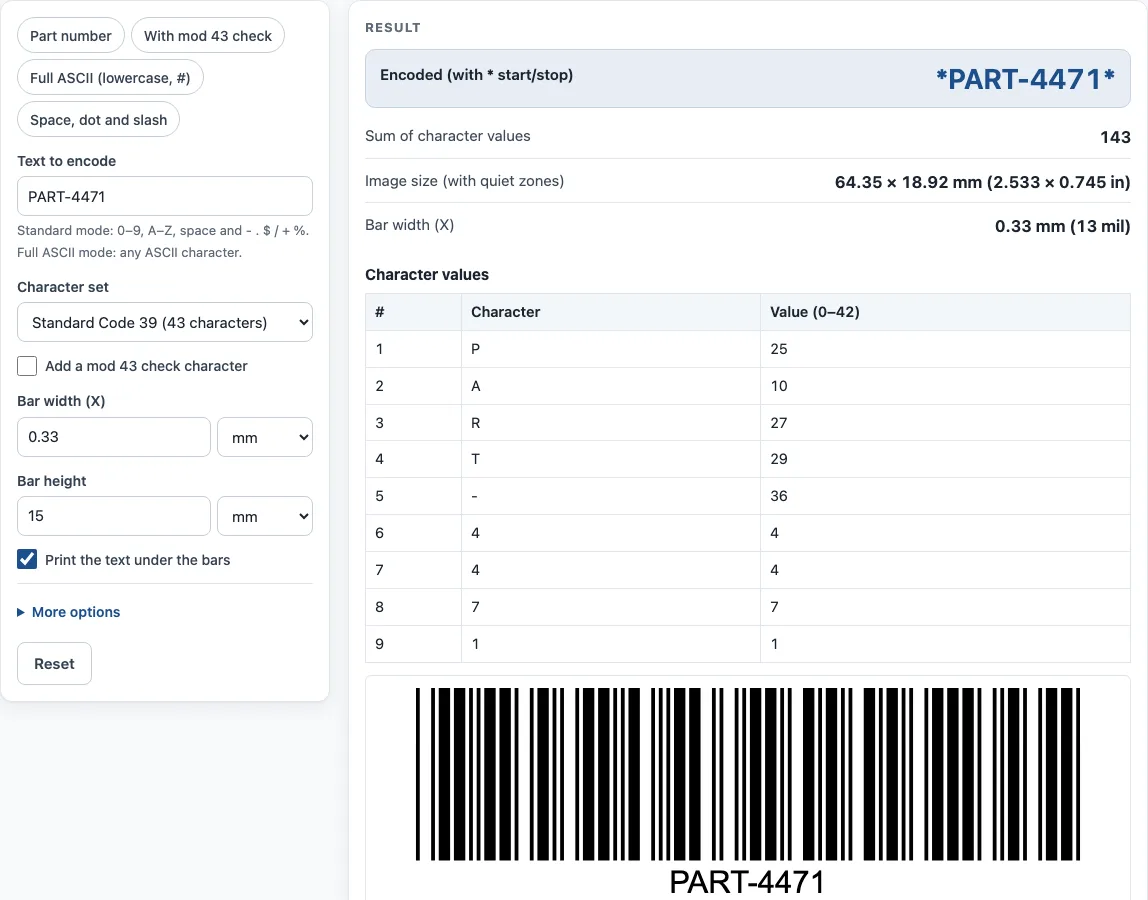
- Type the text in Text to encode. In Standard mode, use only 0–9, A–Z, space and - . $ / + %.
- Choose a Character set: Standard Code 39 (43 characters) or Full ASCII Code 39.
- Tick Add a mod 43 check character if you want one added to the barcode.
- Adjust Bar width (X) and Bar height, and leave Print the text under the bars ticked for readable text under the bars.
- Under More options you can switch the Quiet zones on or off, change the Bar color and Background, and pick a PNG resolution of 300 or 600 dpi.
- Click Download SVG or Download PNG; the table under the barcode lists every character with its value.
- Check the result lines: Encoded (with * start/stop), Check character, Sum of character values, Image size (with quiet zones), Bar width (X) and Data in the barcode.
To try the tool quickly, press one of the example buttons: Part number, With mod 43 check, Full ASCII (lowercase, #), or Space, dot and slash. Under the result, Copy result copies the output, and Copy link saves the page address with all your inputs, so opening it restores the same result. Print / save as PDF prints your inputs, the result, the calculation steps and the date. The “How it was calculated” list shows each step using your own values.
How does a Code 39 barcode encode characters?
Code 39 was developed by David Allais and Ray Stevens of Intermec in 1974 and is defined in ISO/IEC 16388. It is a discrete, variable-length barcode, which means each character stands alone and the barcode grows with the length of the data. Standard Code 39 encodes 43 characters: digits 0–9, capital letters A–Z, space and - . $ / + %.
Each character is built from 9 elements: 5 bars and 4 spaces. Three of those elements are wide and the rest are narrow. A narrow gap separates one character from the next. The tool draws each wide element at three times the width of a narrow one. The asterisk (*) marks the start and stop of the barcode. It is not part of your data, but it appears in the Encoded result line.
Full ASCII Code 39 covers all 128 ASCII characters by writing the ones Standard mode lacks as pairs. Small letters are written as + followed by the capital letter, so +A stands for a. Punctuation uses / or % pairs, so /C stands for #. Control characters use $ or % pairs. A scanner must be set to Full ASCII to read these pairs back as single characters.
How is the Code 39 check character calculated?
The check character is a mod 43 value. Each character has a value: 0–9 equal 0–9, A–Z equal 10–35, - is 36, . is 37, space is 38, $ is 39, / is 40, + is 41, and % is 42. Add up the values of all the characters, then take the remainder after dividing by 43. The character with that value is the check character.
For example, CODE39 gives 12 + 24 + 13 + 14 + 3 + 9 = 75. Then 75 mod 43 = 32, and value 32 is W, so the check character is W.
Code 39 is self-checking: a single misread bar cannot turn one valid character into another. Because of this, the check character is optional. Adding it gives an extra layer of verification when the data is important. Code 39 also has low data density, so the same data needs more space than in Code 128, which makes it a poor choice for very small items.
Sources
- ISO/IEC 16388 (Code 39; not reproduced) and the public summary in Wikipedia: Code 39 — 43 characters, 9 elements with 3 wide, optional mod 43 check, Full ASCII pairs. Examples decoded with zxing-cpp (Full ASCII read back as the original text).
Worked examples
| Input | Result |
|---|---|
| PART-4471 | Encoded as *PART-4471* |
| CODE39 + mod 43 | Encoded as *CODE39W* |
| Order #12 (Full ASCII) | Encoded as *O+R+D+E+R /C12* |
| SN 2026.10/7 + mod 43 | Encoded as *SN 2026.10/7C* |
Calculated by the tool above with these values.
Frequently asked questions
What is a Code 39 barcode?
Code 39 is a barcode type that encodes letters, digits and a set of symbols. It is also called Code 3 of 9 or barcode 39. It is used on labels where letters and digits are needed and space is not tight.
Is barcode 39 the same as Code 39?
Yes. Barcode 39 and Code 39 are two names for the same symbology. The tool treats them identically.
Which characters can I use in a Code 39 generator?
In Standard Code 39 mode, you can use 0–9, A–Z, space and - . $ / + %. Choose Full ASCII Code 39 to encode lowercase letters, # and other ASCII characters.
Do I need the mod 43 check character?
It is optional, since Code 39 is self-checking. Add it when you want an extra check on the data, and leave it off if you don’t need it.
Why does my Code 39 barcode look long?
Code 39 uses wide elements for each character, so it takes more space than denser barcodes such as Code 128. Reducing the bar width (X) makes it smaller, but very small bars may be hard to scan.
Can I use the generated barcode on products?
Yes. Results can be used in commercial work, including on products, packaging and documents, with no attribution required.
Related tools
- Barcode generator — Code 128, Code 39, EAN, UPC, ITF-14, Codabar and GS1-128, single or a sheet of labels.
- Code 128 barcode generator — Code 128 with the code sets and check character worked out.
- Random barcode generator — random EAN, UPC, ITF-14 or Code 128 test barcodes with valid check digits.
- GS1 barcode generator — GS1-128 labels with Application Identifiers, EAN-13 and ITF-14 carton codes.
- UPC barcode generator — UPC-A and UPC-E barcodes for retail products, with add-ons and GS1 sizes.
- Data Matrix generator — a small 2D code for serial numbers, parts and GS1 healthcare labels.