Code 128 Barcode Generator
Type the text and get a Code 128 barcode plus the encoding table: code sets, values, weights and the check character.
This free code 128 generator turns text into a Code 128 barcode image. Type the text you want to encode, and the result shows the barcode with its encoded text, check character and code sets.
The tool runs in your browser, is free, and needs no sign-up. Nothing you type is uploaded.
Code 128 is a high-density linear barcode that can encode all 128 ASCII characters. It is used for product labels, shipping codes, internal asset tags and many other jobs where you need to store letters, digits and punctuation in a compact barcode. If you are making a barcode for a retail product, check the rules for that product type first, because some formats such as GS1-128 add their own structure.
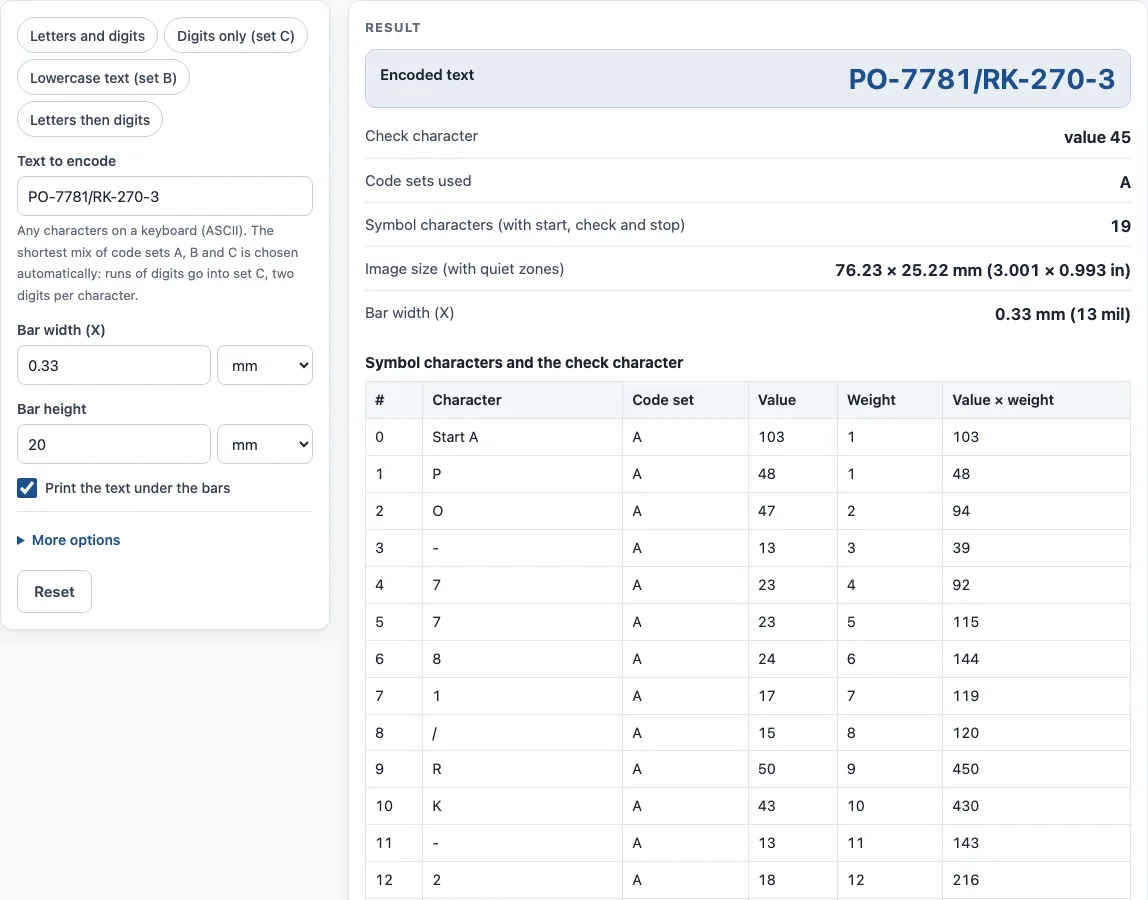
How to use the Code 128 Generator
- Type or paste your text into Text to encode. You can use any characters on a keyboard.
- Set the Bar width (X), the width of the narrowest bar, in mm or mil.
- Set the Bar height.
- Leave Print the text under the bars ticked if you want the human-readable text printed below the barcode.
- Under More options you can switch the Quiet zones (10 modules of blank space on each side) on or off, change the Bar color and Background, and pick a PNG resolution of 300 or 600 dpi.
- Click Download SVG or Download PNG.
- Read the encoding table under the barcode: every symbol character with its code set, value, weight and product.
- Read the result lines: Encoded text, Check character, Code sets used, Symbol characters (with start, check and stop), Image size (with quiet zones) and Bar width (X).
To try the tool quickly, press one of the example buttons: Letters and digits, Digits only (set C), Lowercase text (set B) or Letters then digits.
The How it was calculated list shows each step using your own values. Under the result, Copy result copies the output, and Copy link copies a page address that keeps all your inputs, so opening it restores the same result. Print / save as PDF prints your inputs, the result, the calculation steps and the date.
What is Code 128 and what can it encode?
Code 128 is a linear barcode developed by Computer Identics in 1981 and defined in ISO/IEC 15417. It can encode all 128 ASCII characters, which makes it more flexible than barcodes that only hold digits or a small set of symbols.
To do this, Code 128 uses three code sets. Set A covers capital letters, digits, punctuation and control characters. Set B covers capital and small letters, digits and punctuation. Set C holds pairs of digits from 00 to 99, so a long number takes half the space it would in the other sets. This tool chooses the sets automatically to make the shortest symbol, and it lists every symbol character with its code set, value, weight and product.
Each symbol character is 11 modules wide, made of 3 bars and 3 spaces. A complete symbol has a start character (Start A, B or C), the data characters and any code-set switches, a check character, and a 13-module stop pattern. A quiet zone of at least 10 modules is needed on each side. If you want to encode GS1 Application Identifiers, you need GS1-128, which is Code 128 with an FNC1 character after the start. See the GS1 Barcode Generator for that format.
How is the Code 128 check character calculated?
The check character is a weighted modulo-103 checksum. Start with the start value, then add each character’s value multiplied by its position in the data. Divide the total by 103, and the remainder is the check value. Scanners use this to catch misreads and then drop the check character, so it is not printed in the text under the barcode.
Here is the example used by this tool for the data AB123456. The start is Start A, with value 103. The data is A (33), B (34), a switch to Code C (99), then the pairs 12, 34 and 56. The weighted sum is 103 + 33 + 68 + 297 + 48 + 170 + 336 = 1,055. Since 1,055 mod 103 = 25, the check value is 25.
Sources
- ISO/IEC 15417 (Code 128; not reproduced) and the public summary in Wikipedia: Code 128 — code sets A/B/C, 11-module characters, 13-module stop, weighted mod 103 check, 10-module quiet zone. Examples decoded with zxing-cpp.
Worked examples
| Input | Result |
|---|---|
| PO-7781/RK-270-3 | Check character 45, sets A, 19 symbol characters |
| 1234567890 | Check character 85, sets C, 8 symbol characters |
| Code 128 | Check character 64, sets B, 11 symbol characters |
| AB123456 | Check character 25, sets A, C, 9 symbol characters |
Calculated by the tool above with these values.
Frequently asked questions
Can I use the barcodes commercially?
Yes. You can use the results on products, packaging and documents, and no attribution is required.
Does the tool store or upload what I type?
No. Everything runs in your browser, and nothing you type is uploaded.
Can Code 128 encode lowercase letters?
Yes. Code set B includes capital and small letters. The Lowercase text example uses set B.
Is a shorter barcode possible for long numbers?
Yes. Set C stores two digits per character, so an all-digit string takes about half the space. The tool picks set C for runs of digits automatically.
What quiet zone do I need?
The standard minimum is 10 modules on each side of the symbol. The tool adds exactly that when Quiet zones (under More options) is ticked, which is the default.
Will the check character appear under the barcode?
No. The check character is part of the symbol so scanners can verify it, but the printed text omits it.
What is the difference between Code 128 and GS1-128?
GS1-128 is Code 128 with an FNC1 character after the start, used to carry GS1 Application Identifiers such as (01) GTIN or (00) SSCC. Use the GS1 barcode generator for that format; this page makes plain Code 128.
Related tools
- Barcode generator — Code 128, Code 39, EAN, UPC, ITF-14, Codabar and GS1-128, single or a sheet of labels.
- GS1 barcode generator — GS1-128 labels with Application Identifiers, EAN-13 and ITF-14 carton codes.
- Code 39 barcode generator — Code 39 with mod 43 check or Full ASCII.
- Random barcode generator — random EAN, UPC, ITF-14 or Code 128 test barcodes with valid check digits.
- PDF417 barcode generator — stacked 2D PDF417 symbols with columns and error correction.
- Data Matrix generator — a small 2D code for serial numbers, parts and GS1 healthcare labels.