Barcode Types Chooser (1D vs 2D)
Answer five questions to see which barcode type fits your data, label and scanner.
The Barcode Types Chooser shows which of the main barcode types fits your data, label and scanner. You answer five questions, and it ranks eight symbol families: UPC-A / EAN-13, ITF-14, Code 39, Code 128 (GS1-128), QR code, Data Matrix, PDF417 and Aztec code. The result gives one best choice, any alternatives that also work, and a reason for each symbol.
The tool runs in your browser. It is free, needs no sign-up, and nothing you type is uploaded. Use it when you know what the code must contain but are not sure which barcode type to print, or when you want to compare 1D and 2D barcodes for one job: a retail item, a shipping label, a parts tag or a phone link.
How to use the Barcode Type Chooser
- Under What the code must hold, pick Digits only, Capital letters and digits, Mixed text (lower case, symbols, a web address) or Binary data.
- Under How many characters, type the length of the longest value you will encode. Enter a whole number up to 10,000.
- Under Where it will be used, pick the situation that fits, such as Items sold at a checkout or Tickets, passes and documents.
- Under Room for the code, choose the label size: Wide label (about 100 mm / 4 in), Narrow label (about 50 mm / 2 in) or Tiny area (about 20 mm / 0.8 in).
- Under What reads it, choose Camera or imager scanner, or Laser scanner (linear codes only).
- Read the result lines: Best choice, Also works and Types that fit.
- Check the table All symbols compared for your answers. Each row shows the Symbol, its Kind, its Fit (Best, Works or Does not fit) and a Why.
- Click the link below the table to open the matching generator.
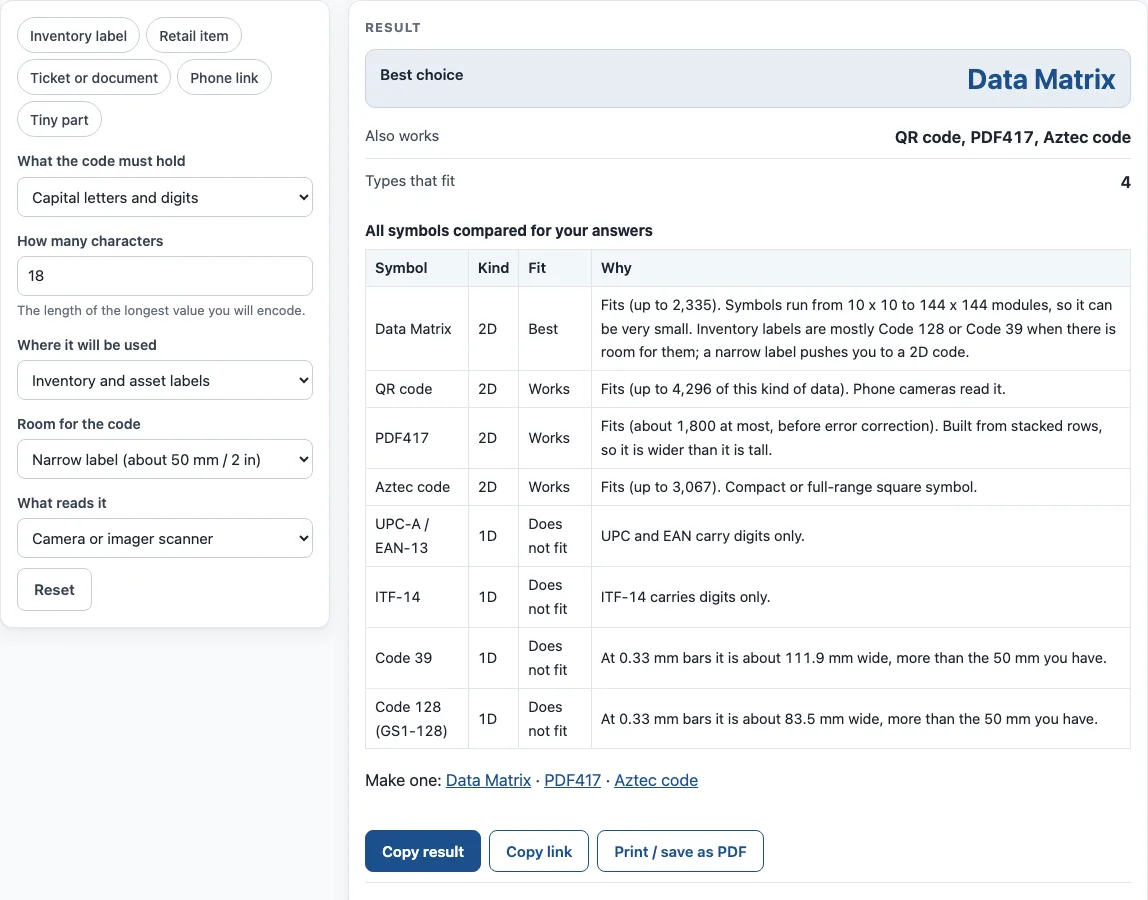
Not sure where to start? The example buttons (Inventory label, Retail item, Ticket or document, Phone link and Tiny part) fill in the answers for that case. Under the result, Copy result copies the answer, and Copy link saves a page address that keeps all your inputs. Print / save as PDF prints the inputs, the result, the calculation steps and the date.
What are the different types of barcodes
Barcode types differ in how much data they hold and how they store it. This chooser compares eight families. UPC-A (12 digits) and EAN-13 (13 digits) are the retail symbols used at checkout, and they hold digits only. ITF-14 is the GS1 symbol for non-retail packaging levels, with 14 digits. Code 128 and GS1-128 are the general and logistics symbols, and they encode all 128 ASCII characters.
The other four are built for more data in less space. QR code is the most widely used type with smartphones. Data Matrix ECC 200 is the symbol that EU FMD and US DSCSA name for medicine packs. PDF417 stacks rows of code and appears on airline boarding passes and US RealID driver licences. Aztec code (ISO/IEC 24778) is another compact 2D option.
What is the difference between 1D and 2D barcodes
A 1D barcode, also called a linear barcode, encodes data in the widths and spacings of parallel lines. A barcode reader scans across it in one direction. A 2D barcode uses rectangles, dots or other patterns arranged in a grid or in stacked rows. It is read by a 2D scanner or by a camera with software.
The difference affects both space and reading equipment. A linear code usually needs more width than a 2D symbol for the same data, so a long value on a narrow label may not fit. A laser scanner reads linear codes only, which is why the chooser marks every 2D symbol as Does not fit when you select that reader. If your items are read by a camera or imager, both groups are possible, and the Room for the code answer decides which ones are practical.
Worked examples
| Input | Result |
|---|---|
| Capital letters and digits, 18, Inventory and asset labels | Best: Data Matrix |
| Digits only, 12, Items sold at a checkout | Best: UPC-A / EAN-13 |
| Mixed text (lower case, symbols, a web address), 300, Tickets, passes and documents | Best: PDF417 |
| Mixed text (lower case, symbols, a web address), 45, Scanned with a phone (links, promotions) | Best: QR code |
| Capital letters and digits, 10, Small parts or regulated products | Best: Data Matrix |
Calculated by the tool above with these values.
Frequently asked questions
Which barcode type should I use?
Answer the five questions in the chooser and start with the Best choice line. For items sold at a checkout with digits only, the tool points to UPC-A or EAN-13. Check with the retailer or carrier before you print, because they may require a specific symbol.
What is the difference between Code 128 and Code 39?
Code 39 has only 43 characters: capitals, digits and - . $ / + % and space. Code 128 encodes all 128 ASCII characters and packs digits two per symbol character, so it stores the same data in less space. In the tool’s inventory example, 18 capital letters and digits would be about 83.5 mm wide in Code 128 and about 111.9 mm in Code 39, both at 0.33 mm bars. Both are wider than a 50 mm label, so the tool recommends Data Matrix.
What is a 2D barcode type?
A 2D barcode type is a matrix or stacked symbol that stores data in rectangles, dots or patterns instead of line widths. The chooser covers four of them: QR code, Data Matrix, PDF417 and Aztec code. Each needs a 2D scanner or a camera with software to read it.
Why does the chooser mark 2D codes as Does not fit?
You have selected Laser scanner (linear codes only) under What reads it. A laser scanner cannot read 2D symbols, so every one of them is marked Does not fit. Choose Camera or imager scanner to see the 2D options.
Does the chooser upload what I type?
No. Everything runs in your browser, and nothing you type is uploaded. The tool is free and needs no sign-up.
Is the result a rule I have to follow?
No. The rules are a starting point, not a standard. A customer, retailer or carrier may require a specific symbol, and checkout scanners are set up for UPC and EAN codes, so ask the retailer before you choose.
Related tools
- Code 128 Barcode Generator — a general-purpose linear code for mixed data or logistics labels
- Code 39 Barcode Generator — the simpler 43-character set some systems still require
- Data Matrix Generator — a very small 2D symbol for parts and medicine packs
- PDF417 Barcode Generator — a stacked 2D symbol for longer text such as document data
- Aztec Code Generator — a compact square 2D symbol for a camera or imager
- UPC Barcode Generator — retail UPC-A and UPC-E symbols for items sold at a checkout