Aztec Code Generator
Type text or a web address to get an Aztec code in the smallest size, with SVG and PNG downloads at print size.
The Aztec Code Generator is a free tool that turns your text into an Aztec Code, the square 2D barcode with a bull’s-eye pattern in the centre. Type your data, choose the error correction, symbol type, module size and colours, and the tool builds the symbol for you. It runs entirely in your browser, so nothing you type is uploaded, and there is no sign-up.
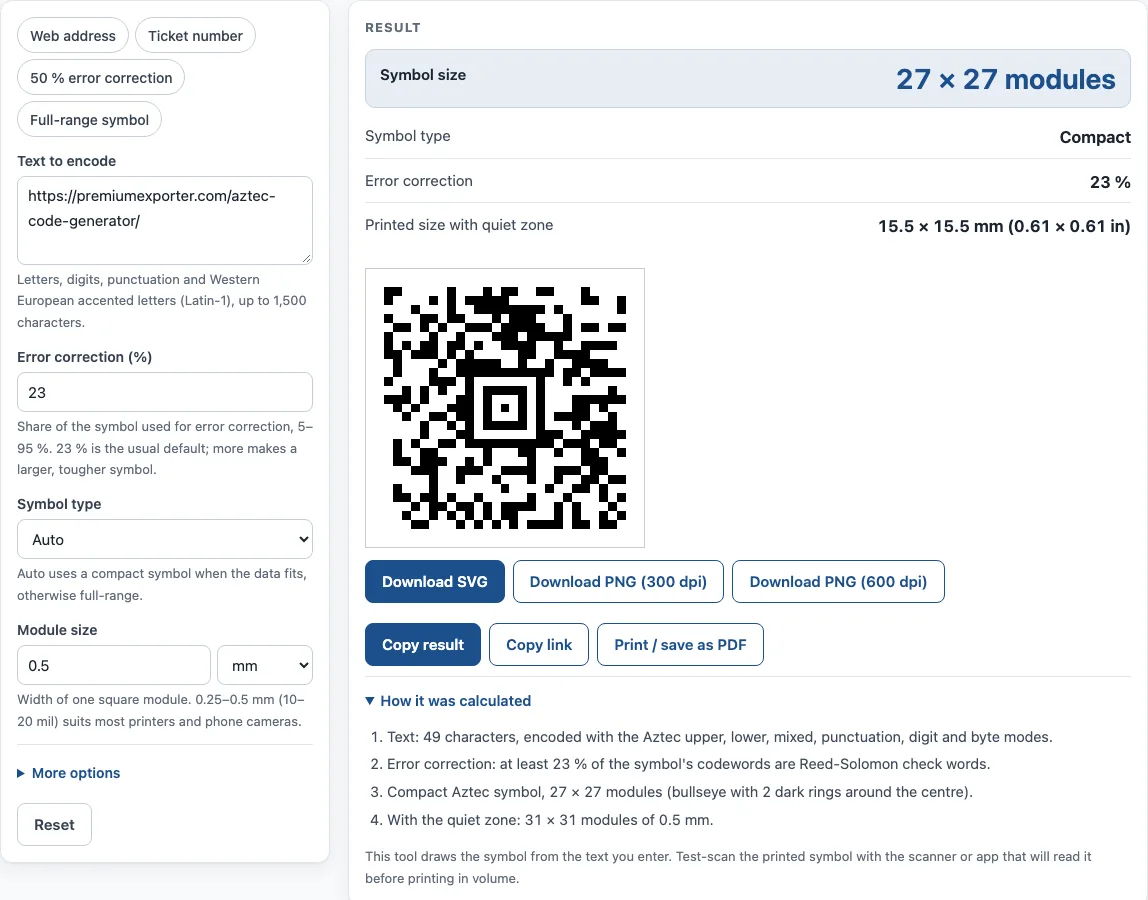
The result panel shows the symbol size, symbol type, error correction level and printed size including the quiet zone. You can copy the result, copy a link that restores your settings, or print or save it as a PDF. Use this aztec barcode generator when you need an Aztec Code for a ticket, boarding pass, label or document.
How to use the Aztec Code Generator
- In Text to encode, type or paste your data. Letters, digits, punctuation and Western European accented letters (Latin-1) are accepted, up to 1,500 characters.
- Set Error correction (%). The usual default is 23 %. You can set any value from 5 to 95 %. A higher value makes a larger symbol that tolerates more damage.
- Choose a Symbol type: Auto, Compact or Full-range. Auto is the default.
- Set Module size. A width of 0.25 to 0.5 mm suits most printers and phone cameras.
- Under More options, set the Quiet zone (modules) and, if you like, the Dark color and Light color (hex such as #000000, or “none” for a transparent background).
- Click Download SVG, Download PNG (300 dpi) or Download PNG (600 dpi).
- Read the result: Symbol size, Symbol type, Error correction and Printed size with quiet zone. Open How it was calculated to see each step with your own values.
Four example buttons fill in the form for you: Web address, Ticket number, 50 % error correction and Full-range symbol. Under the result, Copy result copies the output, and Copy link copies a page address that keeps all your inputs, so opening it restores the same result. Print / save as PDF prints your inputs, the result, the calculation steps and the date. Results may be used in commercial work, such as on products, packaging and documents, with no attribution.
What is an Aztec Code?
Aztec Code is a square 2D matrix barcode with a bull’s-eye finder pattern in its centre. It was invented by Andrew Longacre Jr. and Robert Hussey in 1995, published by AIM in 1997, and standardised as ISO/IEC 24778.
Why does an Aztec Code need less space than other matrix codes?
Because the finder pattern sits in the middle, an Aztec Code does not strictly need a blank quiet zone around it. Some readers still prefer one, which is why the tool keeps the quiet zone setting. Without that margin, the symbol takes less room on the page than many other matrix codes.
How does Auto choose between compact and full-range symbols?
Auto tries a compact symbol first and uses full-range only when the data does not fit. Compact symbols are 15 × 15 to 27 × 27 modules (1 to 4 layers) and have a bull’s-eye of 2 dark rings. Full-range symbols go up to 32 layers and 151 × 151 modules, with 3 dark rings. A full-size 151 × 151 symbol holds up to 3,832 digits, 3,067 letters or 1,914 bytes.
How does error correction change the size of an Aztec Code?
The recommended error correction is 23 % of the symbol capacity plus 3 codewords. More error correction makes a larger symbol that can still be read after more damage. For example, “TICKET 4471 SEAT 12A” at 23 % makes a 19 × 19 compact symbol. With a 2-module margin at 0.5 mm per module, that is 23 modules × 0.5 mm = 11.5 mm wide.
Where are Aztec Codes used?
Aztec Codes appear on airline boarding passes (IATA BCBP), rail tickets such as those from Deutsche Bahn and British National Rail, and some government documents. Because the symbol is read by camera, a phone or a camera-based scanner can read it.
Sources
- ISO/IEC 24778 (Aztec Code; not reproduced) and the public summary in Wikipedia: Aztec Code — compact 15–27 and full-range up to 151 modules, bull’s-eye finder, recommended 23 % + 3 codewords error correction.
- Encoder: bwip-js 4.11.4 (MIT, includes BWIPP by Terry Burton). Every example on this page was printed and decoded with the independent open-source reader zxing-cpp.
Worked examples
| Input | Result |
|---|---|
| https://premiumexporter.com/aztec-code-gen…, 23 % | 27 × 27 modules, Compact |
| TICKET 4471 SEAT 12A, 23 % | 19 × 19 modules, Compact |
| Lot 2026-10 / exp 2027-03-31, 50 % | 23 × 23 modules, Compact |
| Full-range symbol, 23 % | 23 × 23 modules, Full-range |
Calculated by the tool above with these values.
Frequently asked questions
Is this aztec barcode generator free to use?
Yes. The tool is free and needs no sign-up. Everything runs in your browser, and nothing you type is uploaded.
Do I need a special scanner to read an Aztec Code?
No dedicated laser scanner is needed. An Aztec Code needs a camera-based scanner or a phone to read it.
Can I use the Aztec Code in commercial work?
Yes. You can use results on products, packaging and documents, and no attribution is required.
What module size should I print at?
A module width of 0.25 to 0.5 mm suits most printers and phone cameras. Use the printed size shown in the result to check the final dimensions before printing.
What is the most data an Aztec Code can hold?
The tool accepts up to 1,500 characters. A full-size 151 × 151 symbol holds up to 3,832 digits, 3,067 letters or 1,914 bytes.
Can I put a web address in an Aztec code?
Yes. Type the full address, such as https://example.com/page, and phones that read Aztec codes will show it. The Web address example does this.
Should I choose Compact or Full-range?
Leave Symbol type on Auto: it uses a compact symbol when the data fits (up to 27 × 27 modules) and full-range only for longer data. Choose Full-range if the reader you use expects it.
Related tools
- Data Matrix generator — a small 2D code for serial numbers, parts and GS1 healthcare labels.
- PDF417 barcode generator — stacked 2D PDF417 symbols with columns and error correction.
- Barcode generator — Code 128, Code 39, EAN, UPC, ITF-14, Codabar and GS1-128, single or a sheet of labels.
- Code 128 barcode generator — Code 128 with the code sets and check character worked out.
- Random barcode generator — random EAN, UPC, ITF-14 or Code 128 test barcodes with valid check digits.
- GS1 barcode generator — GS1-128 labels with Application Identifiers, EAN-13 and ITF-14 carton codes.